
Normale Ansicht

RasAP – Der perfekte Ad-Blocker zuhause

07. März 2024 um 15:50

Es gibt unzählige Möglichkeiten, die Web-Werbung zu minimieren. Die c’t hat kürzlich ausführlich zum Thema berichtet, aber die entsprechenden Artikel befinden sich auf heise.de hinter einer Paywall. Und heise.de ist ja mittlerweile auch eine Seite, die gefühlt mindestens so viel Werbung in ihre Texte einbaut wie spiegel.de. Das ist schon eine Leistung … Entsprechend lahm ist der Seitenaufbau im Webbrowser.

Egal, alles, was Sie wissen müssen, um zuhause einigermaßen werbefrei zu surfen, erfahren Sie auch hier — kostenlos und werbefrei :-)
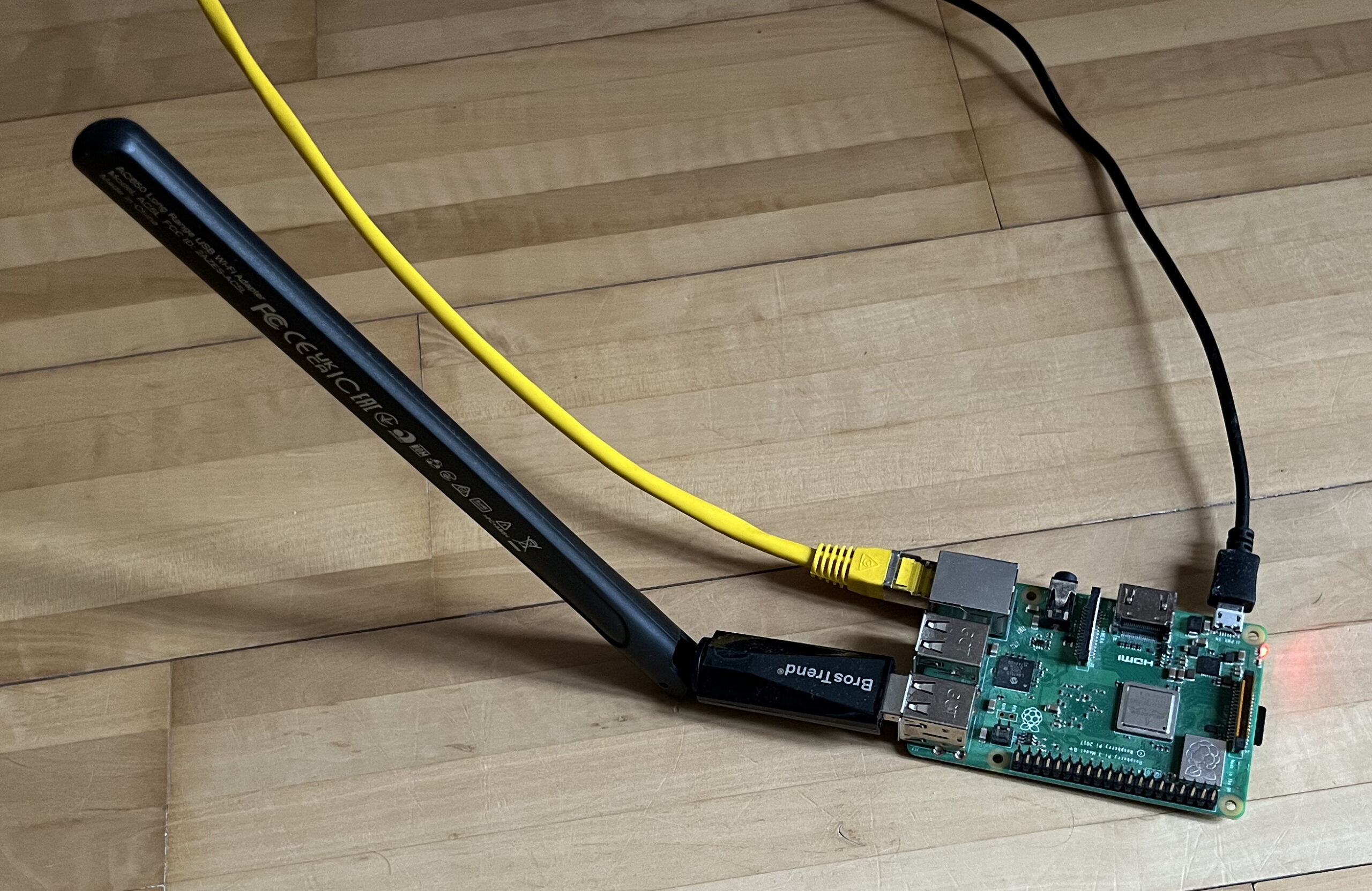
Auf dem Bild ist ein Raspberry Pi 3B+ mit angeschlossenem USB-WLAN-Adapter und Netzwerkkabel zu sehen. Der WLAN-Adapter ist über einen der USB-Ports verbunden, während das gelbe Ethernet-Kabel in den LAN-Port eingesteckt ist. Der Raspberry Pi wird zusätzlich über ein schwarzes Micro-USB-Kabel mit Strom versorgt.
Raspberry Pi 3B+ mit USB-WLAN-Adapter

Konzept

Die Idee ist simpel: Parallel zum lokalen Netzwerk zuhause richten Sie mit einem Raspberry Pi ein zweites WLAN ein. Das zweite Netz verwendet nicht nur einen anderen IP-Adressbereich, sondern hat auch einen eigenen Domain Name Server, der alle bekannten Ad-Ausliefer-Sites blockiert. Jeder Zugriff auf eine derartige Seite liefert sofort eine Null-Antwort. Sie glauben gar nicht, wie schnell die Startseite von heise.de, spiegel.de etc. dann lädt!

Alle Geräte im Haushalt haben jetzt die Wahl: sie können im vorhandenen WLAN des Internet-Routers bleiben, oder in das WLAN des Raspberry Pis wechseln. (Bei mir zuhause hat dieses WLAN den eindeutigen Namen/SSID wlan-without-ads.)
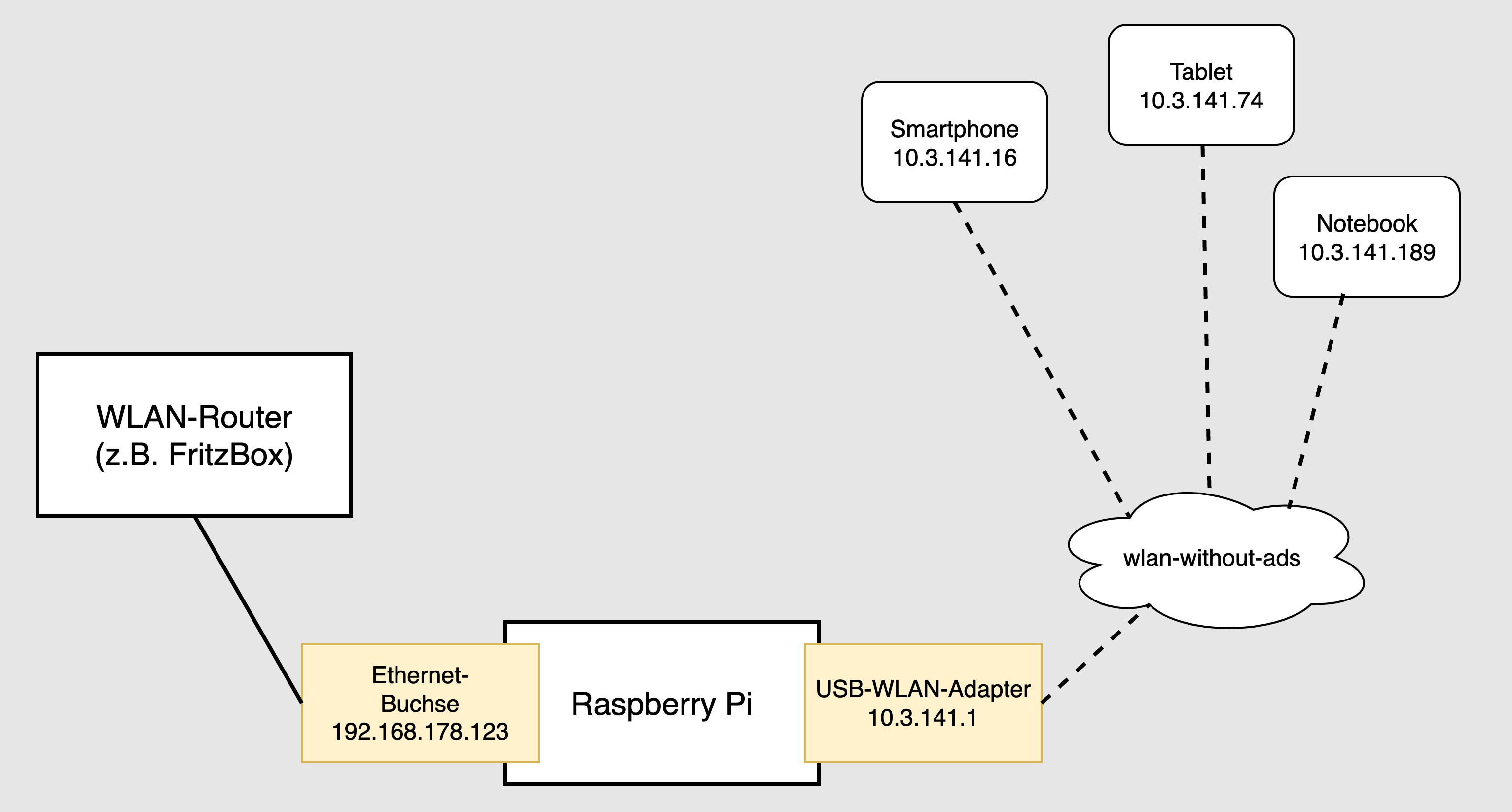
Das Bild zeigt ein Netzwerkdiagramm, in dem ein Raspberry Pi verwendet wird, um ein nahezu werbefreies WLAN-Netzwerk zu erstellen. Der Raspberry Pi ist über eine Ethernet-Buchse mit der IP-Adresse 192.168.178.123 an einen WLAN-Router (z.B. FritzBox) angeschlossen. Zusätzlich ist ein USB-WLAN-Adapter mit der IP-Adresse 10.3.141.1 verbunden, der das Netzwerk "wlan-without-ads" bereitstellt. Verschiedene Geräte wie ein Smartphone, Tablet und Notebook sind drahtlos mit diesem Netzwerk verbunden, erkennbar an den gestrichelten Linien und ihren jeweiligen IP-Adressen.
RaspAP auf dem Raspberry Pi spannt ein eigenes (beinahe) werbefreies WLAN auf

Zur Realisierung dieser Idee brauchen Sie einen Raspberry Pi — am besten nicht das neueste Modell: dessen Rechenleistung und Stromverbrauch sind zu höher als notwendig! Ich habe einen Raspberry Pi 3B+ aus dem Keller geholt. Auf dem Pi installieren Sie zuerst Raspbian OS Lite und dann RaspAP. Sie schließen den Pi mit einem Kabel an das lokale Netzwerk an. Der WLAN-Adapter des Raspberry Pis realisiert den Hotspot und spannt das werbefreie lokale Zweit-Netzwerk auf. Die Installation dauert ca. 15 Minuten.

Raspberry Pi OS Lite installieren

Zur Installation der Lite-Version von Raspberry Pi OS laden Sie sich das Programm Raspberry Pi Imager von https://www.raspberrypi.com/software/ herunter und führen es aus. Damit übertragen Sie Raspberry Pi OS Lite auf eine SD-Karte. (Eine SD-Karte mit 8 GiB reicht.) Am besten führen Sie gleich im Imager eine Vorweg-Konfiguration durch und stellen einen Login-Namen, das Passwort und einen Hostnamen ein. Sie können auch gleich den SSH-Server aktivieren — dann können Sie alle weiteren Arbeiten ohne Tastatur und Monitor durchführen. Führen Sie aber keine WLAN-Konfiguration durch!

Mit der SD-Karten nehmen Sie den Raspberry Pi in Betrieb. Der Pi muss per Netzwerkkabel mit dem lokalen Netzwerk verbunden sein. Melden Sie sich an (wahlweise mit Monitor + Tastatur oder per SSH) und führen Sie ein Update durch (sudo apt update und sudo apt full-upgrade).

RaspAP installieren

RaspAP steht für Raspberry Pi Access Point. Sein Setup-Programm installiert eine Weboberfläche, in der Sie unzählige Details und Funktionen Ihres WLAN-Routers einstellen können. Dazu zählen:

  • Verwendung als WLAN-Router oder -Repeater
  • freie Auswahl des WLAN-Adapters
  • frei konfigurierbarer DHCP-Server
  • Ad-Blocking-Funktion
  • VPN-Server (OpenVPN, WireGuard)
  • VPN-Client (ExpressVPN, Mullvad VPN, NordVPN)

An dieser Stelle geht es nur um die Ad-Blocking-Funktionen, die standardmäßig aktiv sind. Zur Installation laden Sie das Setup-Script herunter, kontrollieren kurz mit less, dass das Script wirklich so aussieht, als würde es wie versprochen RaspAP installieren, und führen es schließlich aus.

Die Rückfragen, welche Features installiert werden sollen, können Sie grundsätzlich alle mit [Return] beantworten. Das VPN-Client-Feature ist nur zweckmäßig, wenn Sie über Zugangsdaten zu einem kommerziellen VPN-Dienst verfügen und Ihr Raspberry Pi diesen VPN-Service im WLAN weitergeben soll. (Das ist ein großartiger Weg, z.B. ein TV-Gerät via VPN zu nutzen.)

Welche Funktionen Sie wirklich verwenden, können Sie immer noch später entscheiden. Das folgende Listing ist stark gekürzt. Die Ausführung des Setup-Scripts dauert mehrere Minuten, weil eine Menge Pakete installiert werden.

wget https://install.raspap.com -O raspap-setup.sh
less raspap-setup.sh
bash raspap-setup.sh

The Quick Installer will guide you through a few easy steps
Using GitHub repository: RaspAP/raspap-webgui 3.0.7 branch
Configuration directory: /etc/raspap
lighttpd root: /var/www/html? [Y/n]:
Installing lighttpd directory: /var/www/html
Complete installation with these values? [Y/n]:
Enable HttpOnly for session cookies? [Y/n]:
Enable RaspAP control service (Recommended)? [Y/n]:
Install ad blocking and enable list management? [Y/n]:
Install OpenVPN and enable client configuration? [Y/n]:
Install WireGuard and enable VPN tunnel configuration? [Y/n]:
Enable VPN provider client configuration? [Y/n]: n
The system needs to be rebooted as a final step. Reboot now? [Y/n]

Wenn alles gut geht, gibt es nach dem Neustart des Raspberry Pi ein neues WLAN mit dem Namen raspi-webgui. Das Passwort lautet ChangeMe.

Sobald Sie Ihr Notebook (oder ein anderes Gerät) mit diesem WLAN verbunden haben, öffnen Sie in einem Webbrowser die Seite http://10.3.141.1 (mit http, nicht https!) und melden sich mit den folgenden Daten an:

Username: admin
Passwort: secret

In der Weboberfläche sollten Sie als Erstes zwei Dinge ändern: das Admin-Passwort und das WLAN-Passwort:

  • Zur Veränderung des Admin-Passworts klicken Sie auf das User-Icon rechts oben in der Weboberfläche, geben einmal das voreingestellte Passwort secret und dann zweimal Ihr eigenes Passwort an.
  • Die Eckdaten des WLANs finden Sie im Dialogblatt Hotspot. Das Passwort können Sie im Dialogblatt Security verändern.
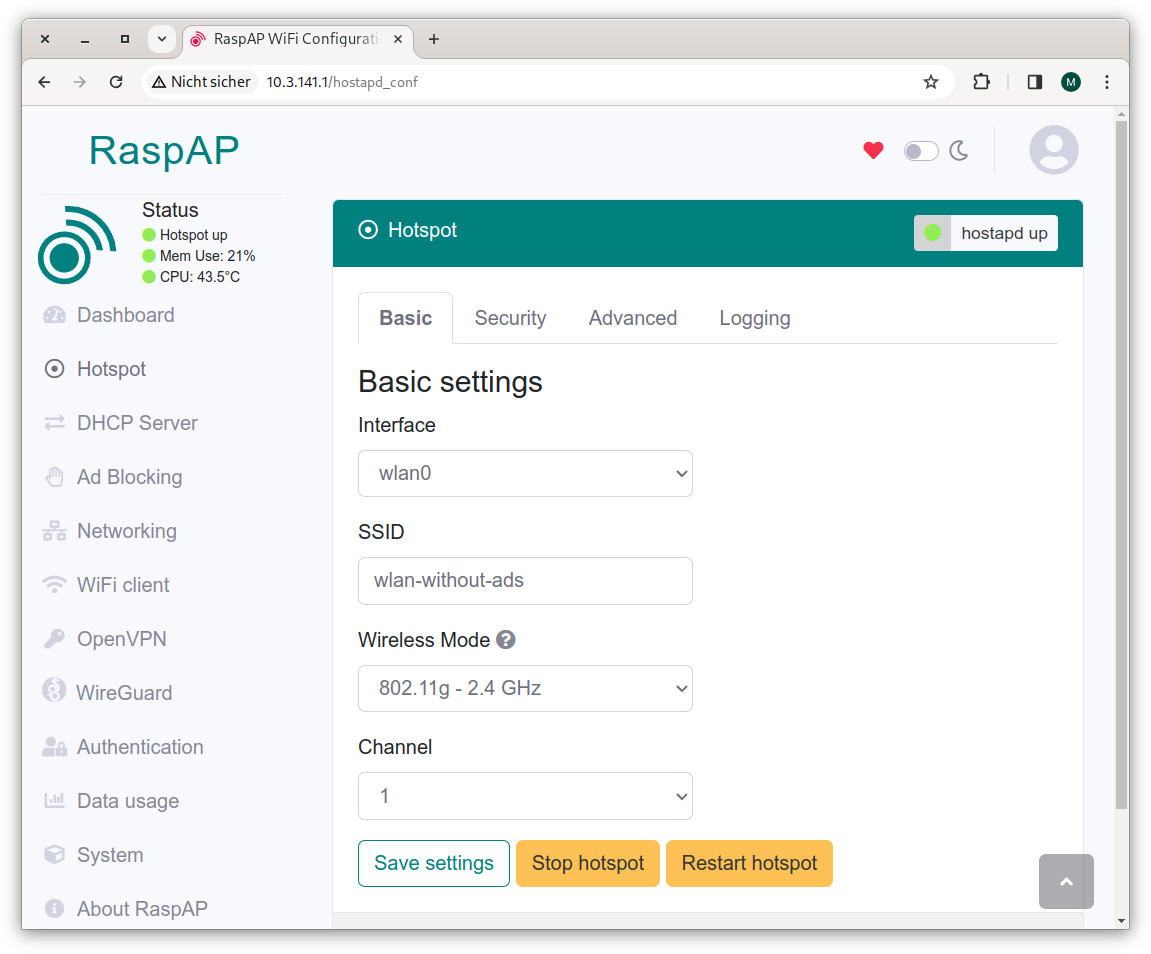
Das Bild zeigt die Benutzeroberfläche von RaspAP, einem Konfigurationstool für einen Raspberry Pi Hotspot. Im Fokus stehen die "Basic settings" für den Hotspot, darunter die Auswahl des Interfaces (wlan0), die SSID und der Wireless Mode (802.11g - 2.4 GHz). Außerdem ist der Kanal auf 1 eingestellt und es gibt Buttons zum Speichern der Einstellungen, zum Stoppen und zum Neustarten des Hotspots.
Die Weboberfläche von RaspAP mit den Hotspot-Einstellungen
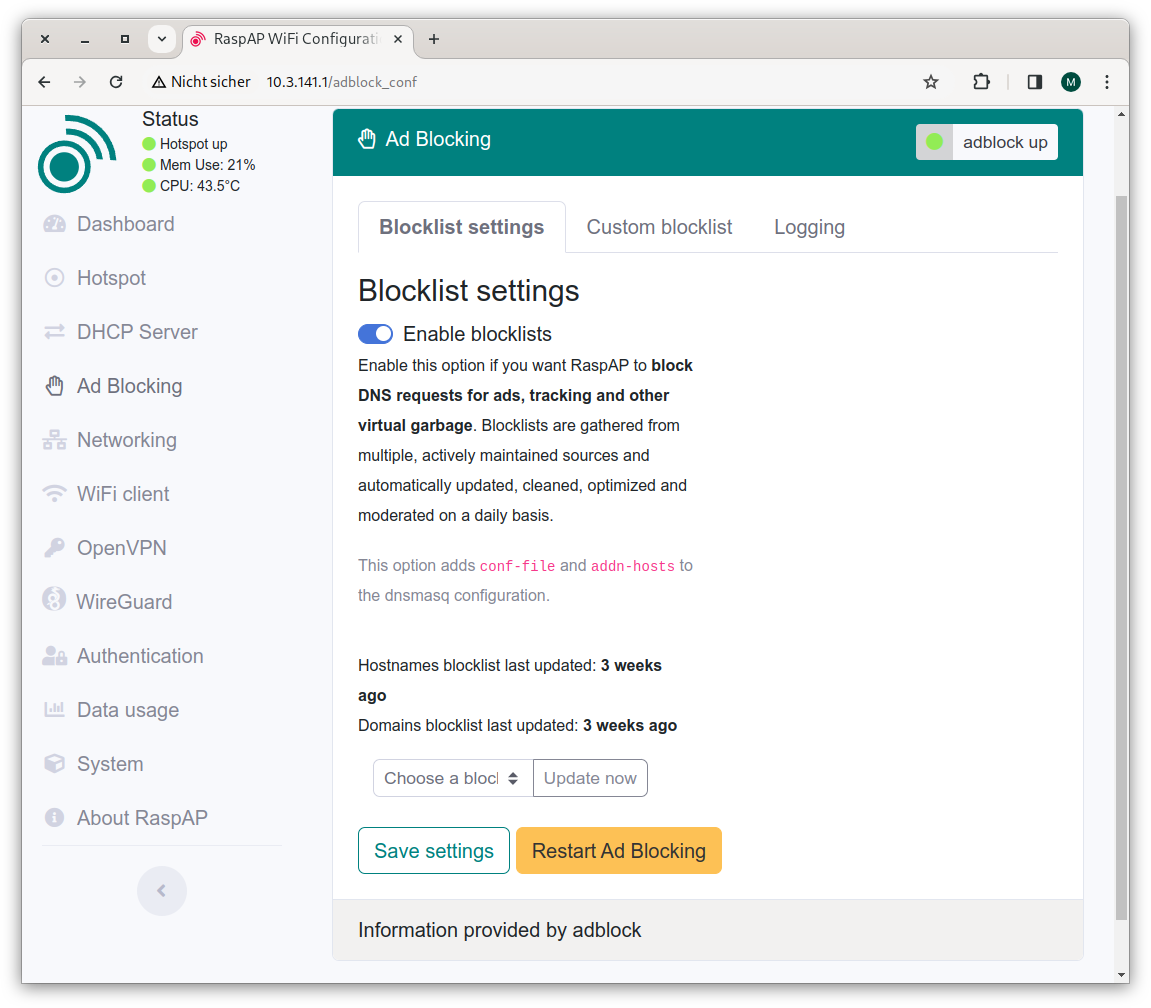
Das Bild zeigt die Benutzeroberfläche einer Ad-Blocking-Konfiguration in einem Webbrowser. Im Abschnitt "Blocklist settings" ist die Option "Enable blocklists" aktiviert, um DNS-Anfragen für Werbung und Tracking zu blockieren. Es wird angezeigt, dass die Hostnamen- und Domänen-Blocklisten zuletzt vor drei Wochen aktualisiert wurden. Unten gibt es Buttons zum Speichern der Einstellungen und zum Neustarten des Ad-Blockings.
Bei den Ad-Block-Einstellungen sind keine Änderungen erforderlich. Es schadet aber nicht, hin und wieder die Ad-Blocking-Liste zu erneuern.

RaspAP verwendet automatisch den WLAN-Namen (den Service Set Identifier) raspi-webgui. Auf der Einstellungsseite Hotspot können Sie einen anderen Namen einstellen. Ich habe wie gesagt wlan-without-ads verwendet. Danach müssen sich alle Clients neu anmelden. Fertig!

USB-WLAN-Adapter

Leider hat der lokale WLAN-Adapter des Raspberry Pis keine großartige Reichweite. Für’s Wohnzimmer oder eine kleine Wohnung reicht es, für größere Wohnungen oder gar ein Einfamilienhaus aber nicht. Abhilfe schafft ein USB-WLAN-Antenne. Das Problem: Es ist nicht einfach, ein Modell zu finden, das vom Linux-Kernel auf Anhieb unterstützt wird. Ich habe zuhause drei USB-WLAN-Adapter. Zwei haben sich als zu alt erwiesen (kein WPA, inkompatibel mit manchen Client-Geräten etc.); der dritte Adapter (BrosTrend AC650) wird auf Amazon als Raspberry-Pi-kompatibel beworben, womit ich auch schon in die Falle getappt bin. Ja, es gibt einen Treiber, der ist aber nicht im Linux-Kernel inkludiert, sondern muss manuell installiert werden:

https://github.com/ElectricRCAircraftGuy/BrosTrendWifiAdapterSoftware

Immerhin gelang die Installation unter Raspberry Pi OS Lite auf Anhieb mit dem folgenden, auf GitHub dokumentierten Kommando:

sh -c 'busybox wget deb.trendtechcn.com/install \
       -O /tmp/install && sh /tmp/install'

Mit dem nächsten Neustart erkennt Linux den WLAN-Adapter und kann ihn nutzen. Das ändert aber nichts daran, dass mich die Installation von Treibern von dubiosen Seiten unglücklich macht, dass die Treiberinstallation nach jedem Kernel-Update wiederholt werden muss und dass die manuelle Treiberinstallationen bei manchen Linux-Distributionen gar nicht möglich ist (LibreELEC, Home Assistant etc.).

Wenn Sie gute Erfahrungen mit einem USB-WLAN-Adapter gemacht haben, hinterlassen Sie bitte einen kurzen Kommentar!

Sobald RaspAP den WLAN-Adapter kennt, bedarf es nur weniger Mausklicks in der RaspAP-Weboberfläche, um diesen Adapter für den Hotspot zu verwenden.

Alternativ können Sie den internen WLAN-Adapter auch ganz deaktivieren. Dazu bauen Sie in config.txt die folgende Zeile ein und starten den Raspberry Pi dann neu.

# Datei /boot/firmware/config.txt
...
dtoverlay=disable-wifi

Danach kennt Raspberry Pi OS nur noch den USB-WLAN-Adapter, eine Verwechslung ist ausgeschlossen.

Vorteile

Der größte Vorteil von RaspAP als Ad-Blocker ist aus meiner Sicht seine Einfachheit: Der Werbeblocker kann mit minimalem Konfigurationsaufwand von jedem Gerät im Haushalt genutzt werden (Opt-In-Modell). Sollte RaspAP für eine Website zu restriktiv sein, dauert es nur wenige Sekunden, um zurück in das normale WLAN zu wechseln. Bei mir zuhause waren alle Familienmitglieder schnell überzeugt.

Nachteile

  • Der Raspberry Pi muss per Ethernet-Kabel mit dem lokalen Netzwerk verbunden werden.
  • Manche Seiten sind so schlau, dass sie das Fehlen der Werbung bemerken und dann nicht funktionieren. Es ist prinzipbedingt unmöglich, für solche Seiten eine Ausnahmeregel zu definieren. Sie müssen in das normale WLAN wechseln, damit die Seite funktioniert.

  • youtube-Werbung kann nicht geblockt werden, weil Google so schlau ist, die Werbefilme vom eigenen Server und nicht von einem anderen Server zuzuspielen. youtube.com selbst zu blocken würde natürlich helfen und außerdem eine Menge Zeit sparen, schießt aber vielleicht doch über das Ziel hinaus.

  • Mit RaspAP sind Sie in einem eigenen privaten Netz, NICHT im lokalen Netz Ihres Internet-Routers. Sie können daher mit Geräten, die sich im wlan-without-ads befinden, nicht auf andere Geräte zugreifen, die mit Ihrem lokalen Router (FritzBox etc.) verbunden sind. Das betrifft NAS-Geräte, Raspberry Pis mit Home Assistant oder anderen Anwendungen etc.

Keine Werbeeinnahmen mehr für Seitenbetreiber?

Mir ist klar, dass sich viele Seiten zumindest teilweise über Werbung finanzieren. Das wäre aus meiner Sicht voll OK. Aber das Ausmaß ist unerträglich geworden: Mittlerweile blinkt beinahe zwischen jedem Absatz irgendein sinnloses Inserat. Werbefilme vervielfachen das Download-Volumen der Seiten, der Lüfter heult, ich kann mich nicht mehr auf den Text konzentrieren, den ich lese. Es geht einfach nicht mehr.

Viele Seiten bieten mir Pur-Abos an (also Werbeverzicht gegen Bezahlung). Diesbezüglich war https://derstandard.at ein Pionier, und tatsächlich habe ich genau dort schon vor vielen Jahren mein einziges Pur-Abo abgeschlossen. In diesem Fall ist es auch ein Ausdruck meiner Dankbarkeit für gute Berichterstattung. Früher habe ich für die gedruckte Zeitung bezahlt, jetzt eben für die Online-Nutzung.

Mein Budget reicht aber nicht aus, dass ich solche Abos für alle Seiten abschließen kann, die ich gelegentlich besuche: heise.de, golem.de, phoronix, zeit.de, theguardian.com usw. Ganz abgesehen davon, dass das nicht nur teuer wäre, sondern auch administrativ mühsam. Ich verwende diverse Geräte, alle paar Wochen muss ich mich neu anmelden, damit die Seiten wissen, dass ich zahlender Kunde bin. Das ist bei derstandard.at schon mühsam genug. Wenn ich zehn derartige Abos hätte, würde ich alleine an dieser Stelle schon verzweifeln.

Wenn sich Zeitungs- und Online-News-Herausgeber aber zu einem Site-übergreifenden Abrechnungsmodell zusammenschließen könnten (Aufteilung der monatlichen Abo-Gebühr nach Seitenzugriffen), würde ich mir das vielleicht überlegen. Das ist aber sowieso nur ein Wunschtraum.

Aber so, wie es aktuell aussieht, funktioniert nur alles oder nichts. Mit RaspAP kann ich die Werbung nicht für manche Seiten freischalten. Eine Reduktion des Werbeaufkommens auf ein vernünftiges Maß funktioniert auch nicht. Gut, dann schalte ich die Werbung — soweit technisch möglich — eben ganz ab.

Let’s make Device Neutrality a reality in Europe!

06. März 2024 um 23:00

Let’s make Device Neutrality a reality in Europe!

As the Digital Markets Act comes into effect today, Device Neutrality starts to become a tangible reality in the European Union. While acknowledging the new law, the FSFE alerts that this is only the first step and further commitment is necessary.

Digital devices are becoming increasingly important tools in our daily tasks, with more and more of us using them in different areas of our lives. However, we, as end-users, are losing control over them – especially the ability to run Free Software – due to unfair practices by device manufacturers, vendors, and platforms.

Device Neutrality aims to restore end-user control over devices by ensuring software freedom in devices, protecting users from lock-ins and promoting their control over data in devices. It seeks to enable end-users to run the software of their choice and use services independently of the control exercised by hardware manufacturers, vendors, and platforms, known as gatekeepers.

Some aspects of Device Neutrality are imposed on large tech companies by the Digital Markets Act (DMA), a recent EU law that enters into force on 7 March, to reestablish higher degrees of competition in digital markets. Therefore, the DMA will be applicable to six gatekeepers: Alphabet, Amazon, Apple, Bytedance, Meta, and Microsoft.

The FSFE has been involved with the DMA throughout the legislative process, and welcomes its entry into force, which makes several elements of Device Neutrality legally enforceable. However, while the DMA represents a very important step in holding gatekeepers accountable for their negative disruptions and distortions in digital markets, the law alone is not enough to promote Device Neutrality to the extent necessary to re-empower end-user control over devices.

The Digital Markets Act: only a first step towards Device Neutrality

Initially, the enforcement of the DMA will be challenging, as the law addresses diverse aspects of devices including the (un)installation of software, the use of third-party apps stores and payment systems, interoperability obligations for operating systems and messaging apps, and some degree of real-time data portability. Imposing legal obligations on such elements will require considerable enforcement efforts and proper monitoring of the technical solutions implemented by the gatekeepers.

Besides, similarly to Router Freedom where network operators create various barriers and hurdles for end-users to exercise that right, gatekeepers may try hard to avoid implementing solutions that will fully benefit end-users, but rather may use the law in ways that can hinder end-users’ rights related to Device Neutrality. For instance, the tech company Apple – one of the gatekeepers – has already gone to court to avoid the DMA obligations, and decided to implement an absurd strategy against third-party apps stores (PDF) that will negatively impact the ability of alternatives such as F-Droid to enter iOS environments.

For these reasons, the FSFE will collaborate with the European Commission and other regulators to monitor compliance with the DMA, so that the DMA will act as a catalyst for Device Neutrality rather than an additional barrier to it.

“DMA represents a bold step from the EU to regulate large companies acting as gatekeepers over devices. However, proper implementation of the law will be challenging, and it will require strict monitoring from civil society to safeguard Device Neutrality. Open Internet needs Device Neutrality. Free Software is key to achieve that”.

-Lucas Lasota, FSFE’s Legal Programme Manager -

Going beyond very large platforms

The DMA is limited to big tech companies. The law only applies to enterprises providing services to at least 45 million monthly active end-users established or located in the EU on a yearly basis. Taking into account other quantitative restrictions, Device Neutrality is safeguarded by the law against only a handful of gatekeepers. Smaller companies may also engage in predatory behavior against Device Neutrality, negatively impacting end-users' rights. However, they are not covered by the DMA.

That’s why the FSFE is promoting Device Neutrality in a much broader context to include not only large companies but any device manufacturer, vendor, or platform. We strongly believe that software freedom should be the default standard and end-users should not be imprisoned into lock-ins. Tech companies should not trap users into walled gardens that limit what they can do with their devices.

Check the new webpage for Device Neutrality and help spread the word with our poster!

In parallel to its involvement with the DMA, the FSFE is launching a new website for Device Neutrality to raise public awareness of topics concerning Device Neutrality. This site points to in-depth insights about Device Neutrality and Free Software, downloadable promotional material, and ways to spread the word. Check it out!

Supporting the work on Device Neutrality

Higher degrees of openness and equality in digital markets can only be achieved when end-users can enjoy software freedom with their devices. The DMA is the first step, and the FSFE will continue to work for Device Neutrality in different areas: monitoring DMA implementation, overseeing compliance, collaborating with regulators and policy makers, promoting public awareness, and expanding the agenda beyond gatekeepers. For that, we count on your support for our work with a donation. Get active and help us empower you to regain control over your devices!

I want to donate for Device Neutrality!

Support FSFE

Neuer Service: LanguageTool Rechtschreibprüfung

06. März 2024 um 11:46

Ein neuer adminForge Service kann ab sofort genutzt werden.

LanguageTool ist eine KI-basierte Komma-, Grammatik- und Rechtschreibprüfung. Korrigiere Texte in vielen verschiedenen Sprachen und schreibe diese um.

LanguageTool ist eine KI-basierte Komma-, Grammatik- und Rechtschreibprüfung. Korrigiere Texte in vielen verschiedenen Sprachen und schreibe diese um.

LanguageTool ist eine KI-basierte Komma-, Grammatik- und Rechtschreibprüfung. Korrigiere Texte in vielen verschiedenen Sprachen und schreibe diese um.

API Adresse: https://spellcheck.adminforge.de/v2

Features basierend auf LanguageTool Basic

  • Unterstützte Sprachen: de, en, es, fr, nl
  • Falsche Grammatikform
  • Einfache Kommasetzung
  • Fehler der Zeichensetzung
  • Erkennen von Umgangssprache
  • Verbesserter Sprachstil
  • Unterschiedliche Maßeinheiten
  • Gendergerechte Sprache
  • …und vieles mehr

So geht’s

Für die folgenden Tools kannst du eine Rechtschreibprüfung mit LanguageTool nutzen. Stelle in den Optionen unter „Experimentelle Einstellungen (nur für Profis)“ den adminForge Server mit folgender Adresse ein: https://spellcheck.adminforge.de/v2

Browser-Add-ons

Office-Erweiterungen

Erweiterungen für E-Mail-Programme

Software: LanguageTool

Euer adminForge Team

UnterstützenDas Betreiben der Dienste, Webseite und Server machen wir gerne, kostet aber leider auch Geld.
Unterstütze unsere Arbeit mit einer Spende und diskutiere ins unserem Chat mit.

by adminForge.

The Dark Mod 2.12 wurde veröffentlicht

Von: jdo
06. März 2024 um 06:49

Laut eigenen Angaben ist The Dark Mod 2.12 ist ein großer Schritt nach vorn für Leute, die Missionen designen! Das Culling-System wurde umfassend überarbeitet, um sicherzustellen, dass Deine CPU und Deine GPU keine Ressourcen für das Rendern unsichtbarer Geometrie, Lichter und Schatten verschwenden. Einige der besten Kartenoptimierungsexperten haben ähnliche Leistungssteigerungen erreicht, wie es beim neuen Culling-System zu finden ist. Allerdings ist das laut eigenen Angaben eine seltene Fähigkeit. Das Team hat es sogar geschafft, die Leistung von Missionen zu verbessern, […]

Der Beitrag The Dark Mod 2.12 wurde veröffentlicht ist von bitblokes.de.

Linux Q&A - Hauke und Jean beantworten Eure Fragen! - Live

05. März 2024 um 16:25

💾

Heute Abend klären wieder Hauke und Jean Deine Fragen live!
Wenn Du das Video unterstützen willst, dann gib bitte eine Bewertung ab, und schreibe einen Kommentar. Vielen Dank!

--------------------

Links:

Frage stellen: https://ask.linuxguides.de

Forum: https://forum.linuxguides.de/
Haukes Webseite: https://goos-habermann.de/index.php
Nicht der Weisheit letzter Schluß: youtube.com/@nichtderweisheit
Linux Guides Admin: https://www.youtube.com/@LinuxGuidesAdmin-xw6fd

Professioneller Linux Support*: https://www.linuxguides.de/linux-support/
Linux Mint Kurs für Anwender*: https://www.linuxguides.de/kurs-linux-mint-fur-anwender/
Ubuntu Kurs für Anwender*: https://www.linuxguides.de/ubuntu-kurs-fuer-anwender/
Linux für Fortgeschrittene*: https://www.linuxguides.de/linux-kurs-fuer-fortgeschrittene/
Offizielle Webseite: https://www.linuxguides.de
Tux Tage: https://www.tux-tage.de/
Forum: https://forum.linuxguides.de/
Unterstützen: http://unterstuetzen.linuxguides.de
Twitter: https://twitter.com/LinuxGuides
Mastodon: https://mastodon.social/@LinuxGuides
Matrix: https://matrix.to/#/+linuxguides:matrix.org
Discord: https://www.linuxguides.de/discord/
Kontakt: https://www.linuxguides.de/kontakt/
BTC-Spende: 1Lg22tnM7j56cGEKB5AczR4V89sbSXqzwN


Haftungsausschluss:
-------------------------------------
Das Video dient lediglich zu Informationszwecken. Wir übernehmen keinerlei Haftung für in diesem Video gezeigte und / oder erklärte Handlungen. Es entsteht in keinem Moment Anspruch auf Schadensersatz oder ähnliches.

*): Werbung

I love FS celebrations +++ FOSDEM 2024 +++ SFP episode

04. März 2024 um 23:00

I love FS celebrations +++ FOSDEM 2024 +++ SFP episode

Our March newsletter is here! Last month took us to FOSDEM, while ‘I Love Free Software Day’ was celebrated all over Europe. We also launched a new SFP episode on the state of Free Software and a discussion on banking and Software Freedom. Check out some interesting reading and event recommendations!

FOSDEM was a blast!

At the beginning of February, FSFE volunteers and staffers went back to Brussels to take part in FOSDEM 2024 with a booth and talks. While for some of us this has become an awesome yearly experience, it was the first time for others. We asked one of our interns to share his thoughts about his first time there, but we also collected the recordings of the talks and devrooms we were involved with.

Find out more!

Thanks to all who made I Love Free Software Day 2024 a great success!

Together with hundreds of people and several organisations, we have celebrated another “I Love Free Software Day” on 14 February! On this day, we reached out to Free Software contributors to say “Thank you!” To all who joined us this time: Thank you for participating in this 14th edition of the “I Love Free Software Day” ❤️❤️❤️!

Read the report!

SFP: The status of Free Software with Karen Sandler and Alexander Sander

Have there been any changes for Free Software in Europe or the USA in the last year? How is Free Software viewed by legislators? What can we do to Support Software Freedom? Karen Sandler and Alexander Sander are active in the Free Software movement and share their views on the current status of Free Software in our society.

Listen to it now!

Software Freedom in banking

Are you forced to use proprietary applications when dealing with your bank? What is the relationship between banking applications and Free Software? Our staff member Florian Snow has been researching this topic and found that banks are pushing the development and use of proprietary applications for two-factor authentification. In doing so, they are restricting users' freedom to choose a one-time password generator of their choice.

Read more and take part in the discussion on the mailing list and on the fediverse!

About Device Neutrality, the DMA, and software licensing

In recent years, the FSFE team has been working for Device Neutrality, promoting ways to re-empower users to control their devices by running Free Software on them. With the upcoming entrance into force of the latest EU legislation on this area – the Digital Markets Act – policy makers are interested in the strategies adopted by large tech corporations (gatekeepers) to comply with the DMA. The FSFE was contacted by the Headquarters for Digital Market Competition of Japan (HDMC) regarding Apple’s strategy to comply with the DMA and its impact on Free Software. Our staff prepared a study in collaboration with F-Droid. You can read the report here (PDF).

In regard to the DMA, we also recommend reading a paper that our Legal Programme Manager, Lucas Lasota, has published linking the DMA, Free Software, and freedom of terminal equipment. This study puts into perspective the role Free Software has in facilitating the process of achieving fairness and contestability of digital markets. As a case study, this article presents the recent regulatory developments involving routers and modems in the EU, and the interaction telecom operators’ monopolistic practices have with Free Software.

Last but not least, the FSFE has also provided an in-depth analysis of the compliance workflow adopted for the Next Generation Internet (NGI) initiative. The study analyzes the compliance issues software projects may face during their implementation of Free Software licenses. This article concludes with the lessons learned from the experience gathered in the three years of implementation of the compliance workflow established for the NGI initiative, and especially notes how REUSE plays a game-changing role in this context.

Please share these publications to strengthen our efforts towards Software Freedom!

Join our next events!

For first time, we are participating in the Circonomia Festival in Fano (PU), Italy. There, we will be hosting, from 8 to 10 March, a workshop on decentralized and sustainable networks and Free Software, and a reading of the book “Ada & Zangemann” in Italian. You are welcome to join us any of the three days! Find out more in the event page.

A weekend later, on 16 and 17 March, you can meet as in the Chemnitzer Linux Days! One more year we are attending this long-standing event for education about Linux and Free Software. We will be present with an information booth, and on Saturday, the FSFE’s Policy Project Manager, Johannes Näder, will present Youth Hacking 4 Freedom, the Free Software competition for young people aged 14-18, currently in its third edition.

And if you are in Utrecht that Saturday, on 16 March, stop by at our info booth at the national Dutch Linux Users Group (NLLGG) meeting!

Remember that you can find all the information about our events at events.fsfe.org.

Take action: spread the word about FediGov!

FediGov is an initiative by the FSFE Swiss local group, together with GNU/Linux.ch, which aims to raise awareness among public institutions to use federated Free Software solutions to communicate with the public.

This campaign encourages individuals to ask their governments to adopt federated and decentralized communications by explaining to their local authorities the importance of sovereign communications in the public sector.

You can help by spreading the word at the local level, but also by contributing to the website with translations or improvements! Take action!

Quote of the month

I think the best thing about YH4F is that it promotes Free Software alternatives to people who haven’t had the chance to realize the benefits of such projects. I use Free Software pretty frequently, especially when it comes to operating systems.

Alexia, Youth Hacking 4 Freedom 2022 participant

Contribute to our Newsletter

We would love to hear from you. If you have any thoughts, pictures, or news to share, please send them to us at newsletter@fsfe.org. You can also support us, contribute to our work, and join our community. We would like to thank our community and all the volunteers, supporters, and donors who make our work possible, with a special mention to our translators who make it possible for you to read this newsletter in your mother tongue.

Your editors, Ana and Tommi

Support FSFE

❌