Der Kolumnist nutzte ausserordentliche Projekttage dazu, einer Klasse mal eine Einführung in Linux zu bieten. Wie es ihm und der Klasse dabei erging, lest ihr hier.
Das InfinityFlex 14 Gen 1 von TUXEDO Computers ist das erste 3-in-1 Convertible, dass auf Linux getrimmt wurde. Auch die Erweiterbarkeit hebt es von anderen Convertibles ab.
European Commission needs to come up with dedicated budget for Free Software solutions
After the recent news that funding for the Next Generation Internet
initiative would be cut for the next phase of Horizon Europe, the
European Commission has expressed vague support for Free Software.
Unfortunately it is failing to provide concrete
examples on how to do so. This has highlighted the fragility
of funding for Software Freedom and the need for change in the
long-term.
A couple of weeks ago, we shared the news that the European
Commission has made the decision to stop funding the Next Generation
Internet initiative (NGI) in its then current draft for the Horizon
Europe 2025 Work Programme. Since 2018, the European Commission has supported the Free
Software ecosystem s through NGI, that provided funding and technical
assistance to Free Software projects. The FSFE has always been a part
of this initiative as a consortium member in the NGI Zero (NGI0)
sub-group, where we provide legal and licensing support to hundreds of
Free Software projects funded by the initiative.
Update from the European Commission: nice words but not long-term plan
The FSFE community has reached to the EU institutions and the Head
of Unit of Next Generation Internet (DG CNECT), answered. In this
letter, it is stated that the European Commission intends to support Free Software
solutions, but it is not clear how and if there will be a budget for
it:
“The Commission will continue to support Open-Source
solutions and the community supported in the NGI programme, in various
initiatives notably to harness its potential to contribute to the
transition of digital networks to a Connected and collaborative
computing and the evolution towards Web 4.0. Both topics are present in
the draft 2025 work programme to be approved by relevant Committee of
Member States and Associated Countries.”
While this is not a confirmation of renewed funding support for the
NGI initiative, it does indicate a vague level of intent to continue
supporting Software Freedom and Free Software development in the EU.
Nevertheless, without any concrete programmes where this funding can
go, and how it will be disbursed to grass-roots organizations that
support Software Freedom, the future of financial support for Free
Software in the EU remains sadly uncertain.
Sustainable funding needed
This development unfortunately exposes a larger issue: that software
freedom in the EU needs more secure, long-term financial support. That
this funding could so easily be left out of the Work Programme
discussions demonstrates how precarious its position has been all
along. Software Freedom needs to be consistently
supported with public funds, and such support should not be easily
displaced by decision-making that favours popular trends in
technological development.
Pressure helps – continue your efforts
This statement from the European Commission is a sign that our
persistence as well as from our community and various organizations
about the lack of proposed funding for NGI’s future has effect.
Following the news of the proposed cut in funding last month, there was
an outcry by us and from other Free Software organizations about how
this would negatively impact Free Software development in the EU.
Nevertheless, more work is definitely needed to continue to push for
funding support for NGI and Free Software. This is why the FSFE is
already in touch with various EU officials and
decision-makers to make sure this funding is secured for the future,
and we call for you to do the same to keep the pressure on the EC high
on this topic.
Reach the European Commission to ask for a sustainable funding
The reply from the European Commission shows that individual actions are helpful: since our
last news item on this
subject, as we’ve already seen how contacting
officials has been helpful to shift opinions. As the allocation
of funds for Horizon EU 2025 is still going on, there is still a chance
to get funds available for NGI:
Help us make member states aware
of and understand this issue. Contact your National
Contact Point (NCP)
and persuade them to also advocate for the NGI funds to be made
available.
Did you receive a response?If so, we kindly ask you to also
share these responses with us at contact@fsfe.org.
Der Wayland-Compositor Sway erhält über die Wlroots-Bibliothek Zugang zu Explicit Sync, einer Technik, die den verbliebenen Problemen mit Nvidia unter Wayland ein Ende setzen soll.
Prozessautomatisierung mit Python steigert die Effizienz von Unternehmen erheblich. Ein zweitägiger Online-Workshop vermittelt praxisnah die Grundlagen und Anwendungen von Robotic Process Automation (RPA). (Golem Karrierewelt, Python)
Das Release bringt Neuerungen für die Theia IDE sowie die Kompatibilität mit VS Code und bildet den ersten Release Candidate für die nächste Community-Version.
Das Betreiben der Dienste, Webseite und Server machen wir gerne, kostet aber leider auch Geld.
Unterstütze unsere Arbeit mit einer Spende und diskutiere in unserem Chat mit.
Aura, der alternative Paketmanager für Arch Linux und das AUR ist in Version 4.0 erschienen. Damit einher geht die Portierung von Haskell nach Rust, neue Befehle und ein neues Konfigurationsformat.
Unsere IT-Sicherheit hängt von den Menschen hinter den Technologien ab. Der Sovereign Tech Fund will mit Geldern der Bundesregierung die Maintainer wichtiger Projekte besser unterstützen.
The EC is planning to cut its funding to
NGI projects, while in Belgium a court has supported end-users’
Router Freedom rights. We also submitted feedback on the NIS2
implementation; learnt about Linqa, a Free Software platform developed
with public money; and gathered with volunteers at the Summer Meeting.
Listen to our new SFP episode.
“We therefore call for these funds to be made available again
immediately and for funding to be secured in the medium to long term.
This is the only way to successfully drive the digitalisation of Europe
forward."
FSFE statement about EC plans to cut NGI funding
EC cuts funding support for Free Software
projects
The Next Generation Internet initiative has supported
Free Software projects with funding and technical assistance since
2018. Despite its proven success, the European Commission made the
decision to cut this funding in the current draft for the Horizon
Europe 2025 Work Programme. This decision highlights the larger problem
of the lack of motivated and sustainable public funding for Free
Software projects.
We therefore call for these funds to be made available again
immediately and for funding to be secured in the medium to long term.
This is the only way to successfully drive the digitalisation of Europe
forward.
Take action! Ask EU representatives to fund Free Software
We need sustainable, secure, and
dedicated funding for NGI and Free Software solutions that help Europe
to control its technology!
Help us to make our EU
representatives aware of it! The budget decision is not yet official -
so there is still a chance to allocate funds for NGI. It is therefore
very important to contact Ursula
von der Leyen (President of the EU
Commission) and DG Connect
to ask them to make the funds available. You
can also contact your National Contact Point
(NCP) and persuade them to
also advocate for the NGI funds to be made available.
Another
way is by supporting us with a donation so we can continue advocating for software freedom.
Belgian court’s decision impacts the future of
Router Freedom
A Belgian court has upheld the decision of the
country’s regulator to introduce Router Freedom for fiber networks. The
objections, raised by a local internet service provider, were deemed
unfounded. This landmark decision represents a significant victory for
consumer rights, and we urge other national regulators to follow this
example.
During the 2024 FSFE Summer Meeting, attendees had the chance to discuss together about the current status of EU policy in regards with Free Software. Volunteers had also the chance to solve their doubts as well as provide ideas about how to take part in it.
Linqa: a Free Software bilingual collaboration
platform developed with public money
Linqa is a bilingual
collaboration platform whose code is Free Software and was developed using
public money. It helps the daily work of the Franco-German Forum for
the Future, a public institution that fosters collaboration among
actors in France and Germany. We dive into the roots of Linqa with the
people behind it.
SFP#25: MirageOS and OCaml with Hannes Mehnert and
Matthias Kirschner
For our 25th episode of the Software Freedom
Podcast we are happy to welcome Hannes Mehnert, one of the MirageOS
core developers. Matthias Kirschner, president of the FSFE, and Hannes
talk about MirageOS. This episode gives an overview of everything from
the basics to the future of MirageOS.
FSFE Summer Meeting 2024! As in 2023, staff and volunteers
gathered at the LinuxHotel for a weekend full of surprises, talks, and
workshops, and of course a lot of fun. For the second year in a row,
the FSFE organised this meeting to inform our volunteers first-hand
about our activities and initiatives as well as to gather their
feedback and ideas.
Join us at FrOSCon
Once again, this August we will be attending FrOSCon in Sankt Augustin.
During 17 and 18 August our team and volunteers will be present with a booth and several
talks.
Also, the local FSFE group in Bonn is hosting a community get-together
the evening before! So even if you cannot make it to FrOSCon, join them
on 16 August!
Contribute to our Newsletter
We would love to hear from you. If you have any thoughts, pictures, or
news to share, please send them to us at newsletter@fsfe.org. You can
also support us, contribute to our work, and join our community. We would like to thank
our community and all the volunteers, supporters, and donors who make
our work possible, with a special mention to our translators who make it
possible for you to read this newsletter in your mother tongue.
Git hat sich als eine wesentliche Versionskontrollsoftware etabliert, die Devs die Verwaltung und Nachverfolgung von Codeänderungen erleichtert. Ein Onlineworkshop vermittelt die Nutzung dieser Open-Source-Software. (Golem Karrierewelt, Versionsverwaltung)
Firefox 129 bietet deutschen und französischen Anwendern jetzt die Speicherung von Adressdaten zum automatischen Eintragen in Formularen. Zudem wurde die Leseansicht erweitert.
Manjaro hat ein erstes experimentelles Abbild seines unveränderlichen Betriebssystems vorgelegt. Die Distribution soll später eine offizielle Edition von Manjaro werden.
Wie ein deutsches "Start-up im Staat", das mit wenig Geld Open Source in die öffentliche Verwaltung bringen will, international Aufsehen erregt. (Open Source, Datenschutz)
Heute möchte ich euch wissen lassen, welche Kombination es geworden ist.
Die Hardware
Ich habe mich für ein wiederaufbereitetes Lenovo T570 entschieden, welches für günstige 240 Euro im Onlinehandel verfügbar war. Da war dann auch noch für 30 Euro ein Schutzbrief drin, der Flüssigkeiten und Stürze abdeckt.
Mit dem Intel Core-i5 der 6. Generation, 8 GB RAM und einer 256 GB SSD bietet dieses Gerät mehr als ausreichend Leistung.
Das Gerät weist einige Gebrauchsspuren auf. Den Preis empfinde ich dennoch günstig, da Geräte dieser Klasse nicht unter 1.000 Euro Neupreis zu bekommen sind. Viel wichtiger jedoch ist, dass der Nutzer sich ebenfalls über das Gerät freut.
Linux-Distribution und Desktopumgebung
Wer die Wahl hat, hat die Qual. Um mir einen ersten Eindruck zu verschaffen, habe ich mir einen USB-Stick mit Ventoy und einer Auswahl an verschiedenen Linux-Distributionen erstellt. So konnte ich die verschiedenen Live-Systeme booten und prüfen, ob alles funktioniert und wie es sich in der Oberfläche navigieren lässt.
Schlussendlich habe ich mich für Debian Cinnamon entschieden. Dies machte nach dem ersten kurzen Test insgesamt den besten Eindruck. Firefox, Thunderbird, Bookmarks, Desktop-Verknüpfungen und Zoom-Client waren schnell eingerichtet und das Gerät bereit zur Übergabe.
Die Übergabe ist erfolgt
Mit der Übergabe gab es eine kurze Einweisung in das Gerät:
Wo schließt man das Netzteil an
Wo schaltet man das Gerät ein
Wie meldet man sich an
Wo findet man die Programme inkl. Tests aller wichtigen Dienste
Druck eines Anhangs aus Thunderbird
Wie fährt man das Gerät herunter
So reibungslos hat das bisher noch nie geklappt. Die Nutzungserfahrung ist positiv. Wir freuen uns.
Netzwerkkonfiguration, Sicherheit und Verwaltung sind wesentliche Aufgaben von Systemadmins. Eine umfassende Einsicht in diese Bereiche bietet dieses E-Learning-Paket mit über 100 Lektionen und 16 Stunden Lerninhalt. (Golem Karrierewelt, Linux)
Ende 2021 bin ich von einem Raspberry Pi 4 mit 4 GB auf einen Intel NUC7PJYH mit Proxmox VE umgestiegen. Hauptgrund damals war, dass bei mir das Upgrade von Raspberry Pi OS 10 auf...
Ikey Doherty ist kein Unbekannter in der Linux-Szene. Er zeichnet unter anderem für Solus Os und den Budgie-Desktop verantwortlich. Jetzt stellt er nach vier Jahren Entwicklung sein von Grund auf gebautes Betriebssystem Serpent OS vor.
PyQuery ist ein starkes Tool für Entwickler, die in Python Daten aus dem Web extrahieren wollen. Es unterstützt CSS-Selektoren dabei, Code einfach zu lesen und zu warten. (Software, Python)
Bei der Arbeit für unser KI-Buch bin ich kürzlich über Aider gestolpert. Dabei handelt es sich um ein Konsolenwerkzeug zum Coding. Im Gegensatz zu anderen Tools (ChatGPT, GitHub Copilot etc.), die Sie beim Coding nur unterstützen, ist Aider viel selbstständiger: Sie sagen, was Ihr Programm machen soll. Aider erzeugt die notwendigen Dateien, implementiert die Funktion und macht gleich einen git-Commit. Sie testen den Code, optimieren vielleicht ein paar Details, dann geben Sie Aider weitere Aufträge. Den Großteil der Coding-Aufgaben übernimmt Aider. Sie sind im Prinzip nur noch für das Ausprobieren und Debugging zuständig.
Wie Sie gleich sehen werden, funktioniert das durchaus (noch) nicht perfekt. Aber das Konzept ist überzeugend, und es ist verblüffend, wie viel schon klappt. Aider kann auch auf ein bestehendes Projekt angewendet werden, das ist aber nicht Thema dieses Blog-Beitrags. Generell geht es mir hier nur darum, das Konzept vorzustellen. Viel mehr Details können Sie in der guten Dokumentation nachlesen. Es gibt auch diverse YouTube-Videos. Besonders überzeugend fand ich Claude 3.5 and Aider: Use AI Assistants to Build AI Apps.
Voraussetzungen
Damit Sie Aider ausprobieren können, brauchen Sie einen Rechner mit einer aktuellen Python-Installation, git sowie einen (kostenpflichtigen!) Key für ein KI-Sprachmodell. Ich habe meine Tests mit GPT-4o von OpenAI sowie mit Claude 3.5 Sonnet (Anthrophic) durchgeführt. Ein wenig überraschend hat Claude 3.5 Sonnet merklich besser funktioniert.
Damit Sie einen API-Key bekommen, müssen Sie bei OpenAI oder Anthrophic einen Account anlegen und Ihre Kontakt- und Kreditkartendaten hinterlegen. Sie kaufen dort vorab »Credits«, die dann durch API-Abfragen aufgebraucht werden. Für erste Tests reichen 10 EUR aus. Sie müssen also kein Vermögen investieren, um Aider auszuprobieren.
Installation von aider
aider ist ein Python-Programm. Die Installation führen Sie am besten in einem Virtual Environment aus, im Prinzip so:
Falls beide Variablen definiert sind, nutzt Aider das Modell Sonnet von Anthrophic. Mit den Optionen --4o oder --sonnet können Sie das Sprachmodell explizit auswählen. Aider unterstützt auch andere Sprachmodelle, empfiehlt aber explizit diese beiden Modell sowie DeepSeek Coder (siehe auch https://aider.chat/docs/leaderboards/).
»Hello World« mit GPT-4o von OpenAI
Um Aider kennenzulernen habe ich mir gedacht, ich beauftrage das Tool, ein ganz simples Webscraping-Tool in Python zu programmieren, das aus einer Wetterseite von orf.at die aktuelle Temperatur in Graz extrahiert. (Warnung: Das Script hat reinen Demonstrations-Charakter. Das regelmäßige Auslesen von Wetterseiten und die Nutzung der so gewonnen Daten — wofür auch immer — ist bei nahezu allen Websites verboten.)
Für den Test habe ich ein neues Verzeichnis eingerichtet, dieses aktiviert und (immer noch im Virtual-Environment) aider gestartet.
mkdir ~/my-projects/test1
cd ~/my-projects/test1
aider --4o
  No git repo found, create one to track GPT's changes (recommended)? y
  Models: gpt-4o with diff edit format, weak model gpt-4o-mini
  Git repo: .git with 0 files
  Repo-map: using 1024 tokens
  Use /help <question> for help, run "aider --help" to see cmd line args
Die weitere Bedienung erfolgt durch Konsolenkommandos. Ich habe damit begonnen, mit /web die Wetterseite zu laden. Beim ersten /web-Kommando installiert Aider nach einer Rückfrage das Webscraping-Tool Playwright. Mit der folgenden Frage habe ich überprüft, dass Aider den Inhalt der gelesenen Seite versteht.
> /web https://wetter.orf.at/steiermark

I see that you've shared a webpage content. How can I assist you with this? Are
you looking to extract specific information, transform the data, or something
else? Please provide more details about what you need.

Tokens: 7,057 sent, 43 received. Cost: $0.04 request, $0.04 session.

> what is the temperature in Graz?

The temperature in Graz, according to the provided content, is 27.2°C.
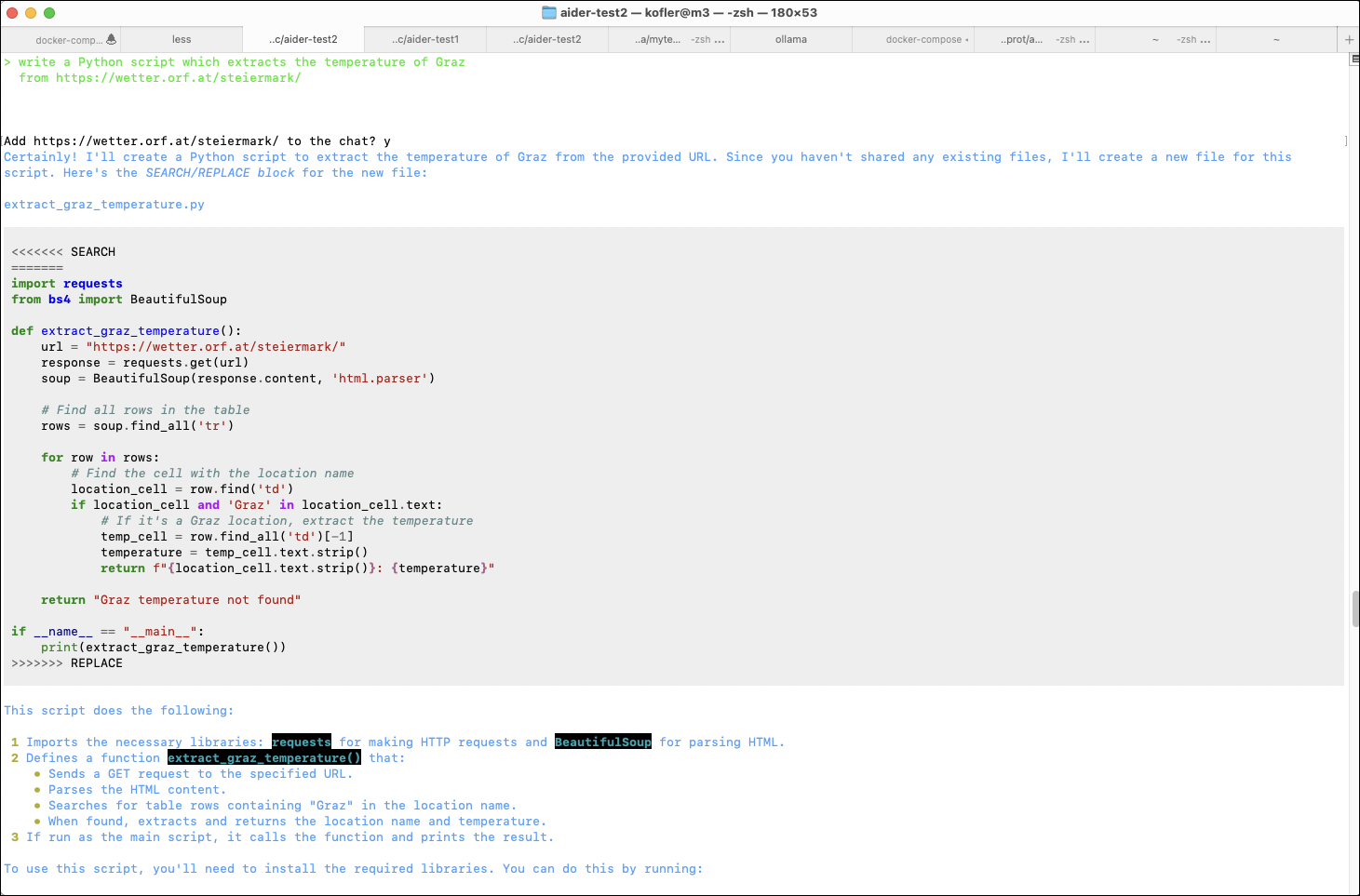
Nach diesem einleitenden Test habe ich nun versucht, eine App zu entwickeln, die diese Aufgabe übernimmt. Aider erzeugt eine neue Datei und speichert die Datei dort. Von der Programmiersprache war nie die Rede, Aider hat sich für Python entschieden. In einem zweiten Prompt habe ich Aider darum gebeten, das Projekt mit einer requirement-Datei auszustatten.
> write a Python script which extracts the temperature of Graz
  from https://wetter.orf.at/steiermark/

Add https://wetter.orf.at/steiermark/ to the chat? y

Let's create a Python script that extracts the temperature of Graz from the
given URL. We'll use the requests library to fetch the webpage content and
BeautifulSoup from the bs4 library to parse the HTML.

Here is the script:

    import requests
    from bs4 import BeautifulSoup

    def get_graz_temperature():
        url = "https://wetter.orf.at/steiermark/"
        response = requests.get(url)
        response.raise_for_status()  # Ensure we notice bad responses

        soup = BeautifulSoup(response.text, 'html.parser')
        graz_section = soup.find('a', href="https://wetter.ORF.at/steiermark/grazuniversitaet/")

        if graz_section:
            temperature_text = graz_section.find_next_sibling(text=True)
            if temperature_text:
                temperature = temperature_text.strip().split(' ')[0]
                return temperature
        return None

    if __name__ == "__main__":
        temperature = get_graz_temperature()
        if temperature:
            print(f"The temperature in Graz is {temperature}°C.")
        else:
            print("Could not find the temperature for Graz.")

This script will:

 1 Fetch the webpage content from the given URL.
 2 Parse the HTML content to find the section related to Graz.
 3 Extract and print the temperature for Graz.

You can run this script in your Python environment to get the current
temperature in Graz.

Tokens: 7,196 sent, 314 received. Cost: $0.04 request, $0.11 session.

Allow creation of new file new_file_path: extract_graz_temperature.py? y

Applied edit to new_file_path: extract_graz_temperature.py
Commit beb001f feat: add script to extract temperature of Graz from weather website
You can use /undo to revert and discard commit beb001f.

> add a requirement file to the project

To add a requirements file to the project, we need to create a new file named
requirements.txt and list the necessary dependencies.

requests
beautifulsoup4

Tokens: 2,372 sent, 66 received. Cost: $0.01 request, $0.13 session.
In einem zweiten Terminal-Fenster oder -Tab habe ich nun ein weiteres Virtual Environment eingerichtet, um alle erforderlichen Module zu installieren und das neue Script zu testen.
Dabei habe ich auch schon den ersten Fehler entdeckt. Aider hat das neue Python-Script nicht extract_graz_temperature.py genannt, sondern new_file_path: extract_graz_temperature.py. Diesen Fehler habe ich mit git behoben.
python3 extract_graz_temperature.py

  extract_graz_temperature.py:13: DeprecationWarning: The
  'text' argument to find()-type methods is deprecated.
  Use 'string' instead.

  Could not find the temperature for Graz.
Der Code enthält offensichtlich einen veralteten Parameter. Zurück im ersten Terminal/Tab bitte ich Aider, das Problem zu beheben. Aider sieht den Fehler ein und korrigiert den Code.
> tried to run the code, got this error:
  extract_graz_temperature.py:13: DeprecationWarning: The 'text'
  argument to find()-type methods is deprecated. Use 'string'
  instead. Can you fix the code? I renamed the code file to
  extract_graz_temperature.py.

extract_graz_temperature.py
Add these files to the chat? y

 <<<<<<< SEARCH
         temperature_text = graz_section.find_next_sibling(text=True)
 =======
         temperature_text = graz_section.find_next_sibling(string=True)
 >>>>>>> REPLACE

...

Tokens: 2,585 sent, 86 received. Cost: $0.01 request, $0.14 session.
Aber auch nach diesem Fix funktioniert das Script nicht. Das Problem ist, dass das Script die Struktur der Wetter-Website nicht korrekt analysiert hat und Beautiful Soup (eine HTML-Parser-Bibliothek für Python) falsch anwendet. Etwas enttäuscht habe ich an dieser Stelle den ersten Versuch abgebrochen. Die bis dahin angefallenen Kosten von 14 US Cent sind immerhin verschmerzbar.
»Hello World« mit Sonnet 3.5 von Anthrophic
Anstatt mich mit der Fehlersuche zu ärgern, habe ich das ganze Experiment mit dem Sprachmodell Sonnet wiederholt. Die folgenden Ausgaben sind stark gekürzt.
mkdir ~/my-projects/test2
cd ~/my-projects/test2
aider --sonnet

> /web https://wetter.orf.at/steiermark

> what is the temperature in Graz?

Based on the information provided in the weather report for Steiermark, there
are multiple temperature readings for Graz:

 1 Graz Heinrichstrasse: 30.3°C
 2 Graz-Straßgang: 29.8°C
 3 Graz-Thalerhof: 29.2°C
 4 Graz-Universität: 30.3°C

The temperatures in Graz range from 29.2°C to 30.3°C, with most locations
reporting around 30°C. The warmest spots in Graz appear to be Heinrichstrasse
and the University area, both at 30.3°C.

Tokens: 7,323 sent, 129 received. Cost: $0.02 request, $0.05 session.

> write a Python script which extracts the temperature of Graz
  from https://wetter.orf.at/steiermark/

...

> add a requirement file to the project

...
In einem weiteren Terminal habe ich nun auch für dieses Projekt ein Python Environment eingerichtet und das Script ausprobiert:
(Virtual Environment einrichten, Requirements mit pip installieren ...)

python3 extract_graz_temperature.py

  Graz Heinrichstrasse: 30,3 °C
Aider in einem Terminal-Fenster
Bingo! Das Script wählt eine der vier Messstellen von Graz aus und zeigt die Temperatur dort an. Wunderbar.
Dementsprechend ermutigt habe ich mein Glück weiter strapaziert. Das Script soll die Durchschnittstemperatur aller vier Messstellen ausrechnen. Zurück in Terminal 1 mit Aider. Wie die folgenden Prompts zeigen, sind fünf Versuche notwendig, bis Aider endlich funktionierenden Code zusammenbringt. (Die ursprüngliche Fassung versucht aus Zeichenketten wie ‚30,3 C‘ in Fließkommazahlen umzuwandeln. Es ignoriert sowohl das deutsche Dezimalformat als auch die Zeichenkette ‚ C‘ am Ende. Die ganze Prozedur dauert inklusive meiner Tests eine Viertelstunde.
> please change extract_graz_temperature.py to calculate the average temperature for Graz

> does not work because of german number format (1,3 instead of 1.3); please fix

> still fails, probably because temperature string contains ' C' at the end; please fix once more

> still fails, the space in ' C' is a fixed space; try again

> it's the unicode fixed blank; just drop the last two characters

Tokens: 3,153 sent, 211 received. Cost: $0.01 request, $0.16 session.
Immerhin, das Script funktioniert jetzt:
python3 extract_graz_temperature.py

  Average temperature for Graz: 29.9°C
Die API-Kosten für die Entwicklung des Scripts betrugen 13 US Cents. Meine Arbeitszeit habe ich nicht gerechnet ;-)
Fazit
Im Internet finden Sie diverse Videos, wo Aider scheinbar auf Anhieb perfekt funktioniert. Meine Tests haben gezeigt, dass das durchaus nicht immer der Fall ist.
Was mich trotz aller Fehler begeistert, ist das Konzept: Am besten führen Sie Aider in einem VSCode-Terminal aus, während in VSCode das Projektverzeichnis geöffnet ist. (Das Ganze funktioniert natürlich auch mit jedem anderen Editor.) Dann haben Sie eine grandiose Umgebung zum Testen des Codes sowie für dessen Weiterentwickung mit Aider.
Ja, weder Aider noch die von Aider genutzten Sprachmodelle sind zum jetzigen Zeitpunkt perfekt. Aber das Potenzial, das hier schlummert, ist enorm. Sie sind damit quasi eine Abstraktionsebene über dem Code. Sie geben Aider Kommandos, wie es den Code weiterentwickeln oder verbessern soll, ohne sich im Detail mit Funktionen, Schleifen oder Variablen zu beschäftigen. (Dieses Wissen brauchen Sie zum Debugging aber weiterhin!)

 Anmelden