 Anmelden
Red Hat marches full steam ahead towards AI

At its summit, Red Hat also shows that there is no way around AI. But you won't find a chatbot or another OpenAI partnership.

At its summit, Red Hat also shows that there is no way around AI. But you won't find a chatbot or another OpenAI partnership.

Auf seinem Summit zeigt auch Red Hat, dass an KI kein Weg vorbeiführt. Doch noch einen Chatbot oder eine weitere OpenAI-Partnerschaft sucht man vergeblich.
May comes with legal news such as the Legal & Licensing Workshop and the Bitcoin lawsuit regarding the liability of Free Software developers. We also talked to two 2023 YH4F participants and our Danish local group sent an Open Letter to their parliament. Did you see that Ada & Zangemann won a prize and that the French ebook version is now available?

Table of contents
"As in our democracies, the distribution of power in the field of technology is essential. And we need to show that an inclusive path is possible".
-Matthias Kirschner, thanking the Forum InCyber for the prize given to Ada & Zangemann.For the second year in a row, the Swedish city of Gothenburg hosted an edition of the Free Software Legal & Licensing Workshop (LLW), the annual conference for the Legal Network members. The 2024 edition brought new faces and great discussions and presentations on current legal and licensing issues related to technological developments such as AI.
Find out more about the Youth Hacking 4 Freedom participants of the 2023 edition. We are continuing this series talking with Antoni and Tobias: Antoni developed a dictionary to preserve endangered languages, and Tobias conceived a rich featured calendar.
Free Software is everywhere, with studies estimating that it is present in about 96% of the applications that we use. But what are the responsibilities and liabilities of the Free Software developers? A potential threat to Free Software developers looms in the form of an ongoing lawsuit in the UK involving Bitcoin and its core developers.
The FSFE Danish local group has sent an Open Letter to the IT spokespersons of all the political parties in the Danish Parliament, entitled “Digitalisation problems can be solved with Free/Open Source Software”. In this letter, the local group pointed out several examples of cases in which using proprietary software is harming citizens’ rights and privacy, for example the municipalities' strong wish to use proprietary software (Google Classroom) in schools, which is actively sharing students' private data to Google in violation of the GDPR.
The local group is currently waiting for an official answer from the parliamentarians though they have already received positive responses.
You can check the letter (in Danish) here.
The German public broadcasters ARD and ZDF have announced that they will integrate their media centres in future and publish their code as Free Software. Under the name ‘Streaming OS’, the software will be available to the general public under a Free Software licence.
In their announcement, the directors of the broadcasters emphasise that by publishing the code, they want to give something back to society that it has previously paid for. ARD and ZDF are thus addressing the core idea of our FSFE initiative ‘Public Money? Public Code!’. We are looking forward to seeing Streaming OS and its code in 2025!
 The Berlin group of the FSFE participated in the 2024 edition of the
Umweltsfestival (Environmental Festival) together with Bits&Bäume
Berlin and KDE Eco. Our volunteers explained to festival attendees the
sustainable use of computers with Free Software as well as other FSFE
initiatives such as Public Money, Public Code and
even answered questions about the Fediverse.
The Berlin group of the FSFE participated in the 2024 edition of the
Umweltsfestival (Environmental Festival) together with Bits&Bäume
Berlin and KDE Eco. Our volunteers explained to festival attendees the
sustainable use of computers with Free Software as well as other FSFE
initiatives such as Public Money, Public Code and
even answered questions about the Fediverse.
Do you want to help spread the word about Free Software to the younger generations? You can do it with an Ada & Zangemann reading! If you like children, this is an easy and a great way to talk to them about Free Software. And everyone who has done it has found it a really rewarding and enriching experience!
If you are interested in facilitating a reading of the book in schools or libraries, write to contact@fsfe.org.
We would love to hear from you. If you have any thoughts, pictures, or news to share, please send them to us at newsletter@fsfe.org. You can also support us, contribute to our work, and join our community. We would like to thank our community and all the volunteers, supporters, and donors who make our work possible, with a special mention to our translators who make it possible for you to read this newsletter in your mother tongue.
Your editor, Ana
Seit Nextcloud Hub 8 (29.0.0) ist ChatGPT nicht mehr über den Picker der Nextcloud zu erreichen. Dieser Umstand kann Nerven kosten, wenn OpenAI’s KI-Dienst hin und wieder genutzt wird und man plötzlich feststellt, dass dieser nicht mehr funktioniert. So ging es mir, als ich den in die Nextcloud integrierten KI-Assistenten einem kleinen Publikum vorstellen wollte. Da das neueste Release 29.0.0 noch recht frisch ist, findet man derzeit wenig Hinweise, wie man ChatGPT weiter nutzen kann.
Dies hat mich nun dazu bewogen einen kleinen Artikel hierzu zu schreiben. Grundvoraussetzung ist jedoch ein Account beim US-amerikanischen Softwareunternehmen OpenAI bei dem ein API-Key erstellt wird.
Des weiteren müssen in der Nextcloud die Apps OpenAI and LocalAI integration und Nextcloud Assistant hinzugefügt und aktiviert werden.

Im Anschluss wird der API-Key, wie im Screenshot zu sehen ist, in der App OpenAI and LocalAI integration hinterlegt.

Nun kann man über den neuen Nextcloud-Assistent das KI-Tool nutzen.


Viel Spaß!
Die Geschwindigkeit bei der lokalen Ausführung großer Sprachmodelle (LLMs) wird in Zukunft zu einem entscheidenden Kriterium für die CPU/GPU-Auswahl werden. Das gilt insbesondere für Software-Entwickler, die LLMs lokal nutzen möchten anstatt alle Daten an Anbieter wie ChatGPT in die Cloud zu übertragen.
Umso verblüffender ist es, dass es dafür aktuell kaum brauchbare Benchmarks gibt. In Anknüpfung an meinen Artikel Sprachmodelle lokal ausführen und mit Hilfe des Forum-Feedbacks habe ich die folgende Abbildung zusammengestellt.
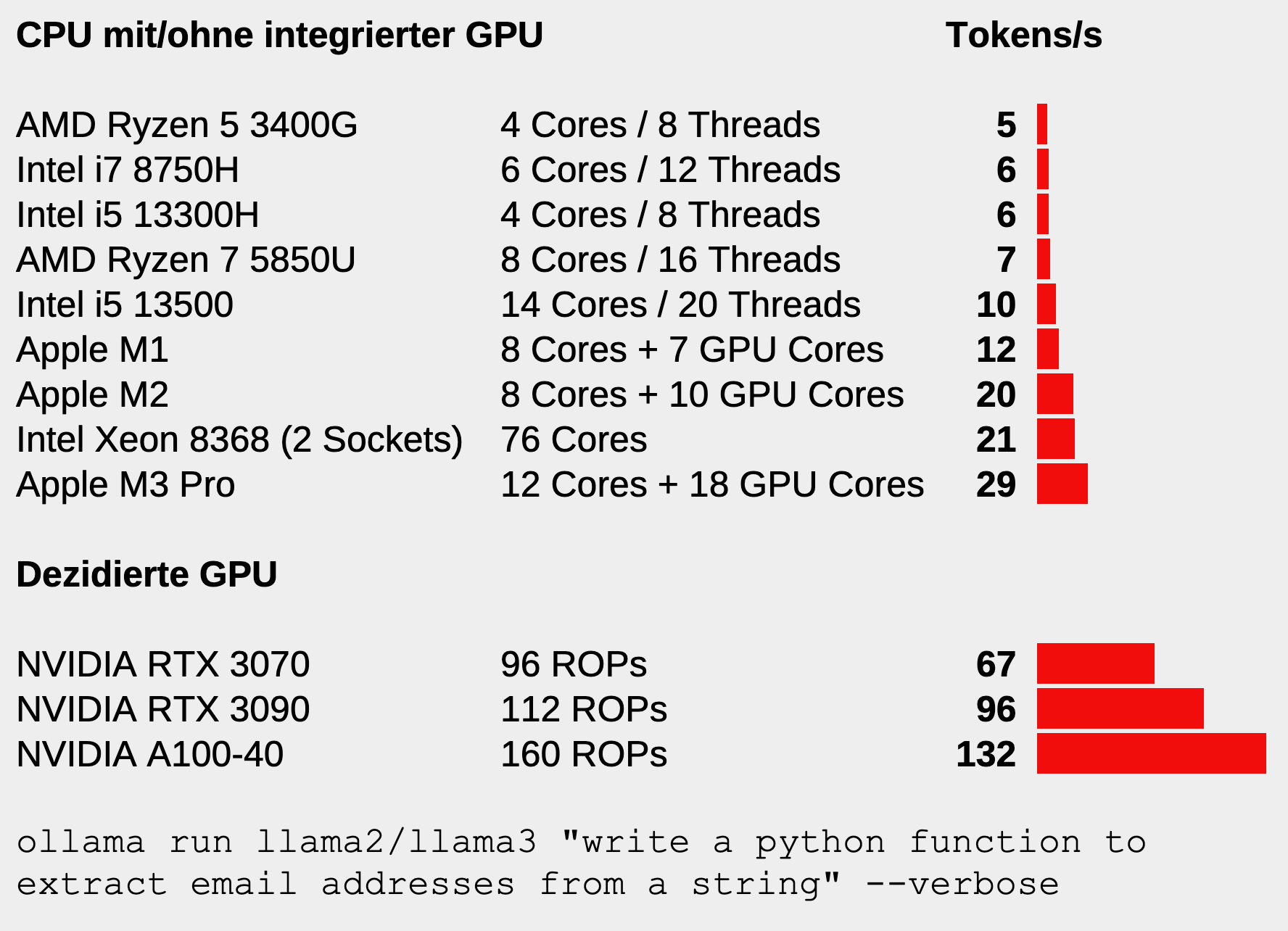
Die Geschwindigkeit in Token/s wird — zugegeben unwissenschaftlich — mit der Ausführung des folgenden Kommandos ermittelt:
ollama run llama2 "write a python function to extract email addresses from a string" --verbose
oder
ollama run llama3 "write a python function to extract email addresses from a string" --verbose
Bei den Tests ist llama3 um ca. 10 Prozent langsamer als llama2, liefert also etwas weniger Token/s. Möglicherweise liegt dies ganz einfach daran, dass das Sprachmodell llama3 in der Standardausführung etwas größer ist als llama2 (7 versus 8 Mrd. Parameter). Aber an der Größenordnung der Ergebnisse ändert das wenig, die Werte sind noch vergleichbar.
Beachten Sie, dass die im Diagramm angegebenen Werte variieren können, je nach installierten Treiber, Stromversorgung, Kühlung (speziell bei Notebooks) etc.
Helfen Sie mit! Wenn Sie Ollama lokal installiert haben, posten Sie bitte Ihre Ergebnisse zusammen mit den Hardware-Eckdaten im Forum. Verwenden Sie als Sprachmodell llama2 bzw. llama3 in der Defaultgröße (also mit 7 bzw. 8 Mrd. Parameter, entspricht llama2:7b oder llama3:8b). Das Sprachmodell ist dann ca. 4 bzw. 5 GByte groß, d.h. die Speicheranforderungen sind gering. (Falls Sie das LLM mit einer dezidierten GPU ausführen, muss diese einen ausreichend großen Speicher haben, in dem das ganze Sprachmodell Platz findet. Je nach Betriebssystem sind u.U. zusätzliche Treiber notwendig, damit die GPU überhaupt genutzt wird.)
Ich werde das Diagramm gelegentlich mit neuen Daten aktualisieren.



Ubuntu 24.04 liefert mit GNOME 46, frischem Installer und viel Neuem einen soliden Linux-Desktop. Für Unmut sorgt der fortgesetzte Snap-Zwang. Ein Überblick.

Die freie Bildbearbeitungsoftware GIMP bringt in der neuesten Version 2.10.38 einige Neuerungen, unter anderem eine verbesserte Unterstützung für (Zeichen-)Tablets unter Windows. Darüber hinaus soll die als „Stable“ gekennzeichnete Aktualisierung die häufig gewünschte Rückportierungen von GTK3 zu GTK2 mitbringen.
 Als führende Open-Source-Lösung für Web Analytics ermöglicht Matomo eine effektive Überwachung der Performance von Webseiten und tiefe Einblicke in deren Daten, wie dieser Online-Workshop der Golem Karrierewelt zeigt. (Golem Karrierewelt, Datenschutz)

Ubuntu 24.04 glänzt mit aktueller Software und bringt sonst nur wenige große Neuerungen. Für Admins bestehender Server ist das Update eine sichere Bank.
For the second year in a row, the Swedish city of Gothenburg hosted an edition of the Free Software Legal & Licensing Workshop (LLW), the annual conference for Legal Network members. The 2024 edition brought new faces and great discussions and presentations on current legal and licensing issues related to technological developments such as AI.

Under a sunny and blue sky, the beautiful Swedish city of Gothenburg once again hosted FSFE’s Free Software Legal & Licensing Workshop (LLW), a two and a half day conference for members of the Legal Network community to meet face-to-face and share legal expertise in a safe space. It was great to have attendees engaging with the speakers in interesting legal discussions, as well as to see them use the venue to engage in impromptu discussions on legal theory, policy, and case law related to Free Software topics. This shows how valuable this conference has become for Free Software legal professionals, who arrived from Europe, the Americas, and Asia, and the importance of a healthy community to encourage discussion of the most current Free Software legal topics and to network in order to build a culture of knowledge exchange in the legal sector.
Discussion, even controversial, can help legal experts to make better decisions while accomplishing the mission of empowering users to control technology. Good examples are Artificial Intelligence and Machine Learning, that continued to be hot topics during this year’s edition, with a number of discussions on the conference agenda touching on the legal ramifications of AI developments on software and licensing.
Nevertheless, there were many other developments from the past year for attendees to discuss as well, from new legislative initiatives and case law in various jurisdictions within and outside the European Union, to presentations to introduce various community-initiated compliance tools, to conversations about more philosophical ideas regarding Free Software and community.
"I have been working for 2 years in this field now. In the past 2 days I learnt more on those topics than in the 2 years before", said one participant in LLW 2024
This conference also gives newcomers who may be a little shy about participating in discussions on the mailing list a chance to introduce themselves and meet various more established members of the community in person. The FSFE believes in the importance of supporting young professionals, which is why this conference also offers a mentoring programme, so that experienced members can help integrate newcomers into the Free Software legal community, as well as to help them build professional connections and expertise.
We appreciate all Legal Network members who took the time to participate in person and hope to see them again next year. It is extremely heartening for us to see the Free Software legal community grow in strength and knowledge with regular meetings like the LLW.
We want to thank our sponsors: Intel, Red Hat, Microsoft, Amazon, Bosch, Ericsson, Siemens, Volvo, Bird & Bird, Google, the law firm Heuking, and the Open Invention Network.
The Legal Network is a neutral, non-partisan group of experts in different fields involved in Free Software legal issues. Currently the Legal Network has over 400 participants from different legal systems, academic backgrounds and affiliations.
The aim of the Legal Network is to promote discussion and foster better knowledge of the legal constructs that back Free Software. The conversations on the Legal Network are intended to be dynamic, thought-provoking, and up to speed with the most recent developments.
The Legal Network is a safe space to promote legal knowledge about Free Software so that companies can make strategic decisions about Free Software development based on an understanding of how Free Software licensing and other related legal issues work. This allows Free Software developers and legal professionals who work within larger companies to continue to contribute to software freedom.
Admission to the Legal Network is restricted, and the discussions held there are confidential. Nevertheless, this does not mean that the content of the mailing list is contained away from the larger Free Software community. The Chatham House Rule applies to all discussions on the Legal Network mailing list and at Legal Network events, which enables members to use the information received, but not to reveal the identity nor the affiliation of the speaker or any of the participants involved in the discussion.

Die freie Software SystemRescue ist in Version 11.01 erschienen und bringt neben dem Linux-Kernel 6.6.30 (LTS) auch kleine Verbesserungen. Beispielsweise wurde die ins Betriebssystem implementierte Partitions-Software GParted in einer aktualisierten Fassung (GParted-1.6.0) eingepflegt. Auch Fehlerkorrekturen sind inkludiert.

Der Instant Messenger Telegram erhält in der aktualisierten Version 5.0.0 für den Desktop neue Features. Dazu zählen unter anderem das Anzeigen von letzten Chats und häufigen Kontakten im Suchfeld. Darüber hinaus können Premium-Nutzer in der neuen Version animierte Emojis in Umfragen verwenden.

Die freie Software FrostWire ist in Version 6.13.2 mit einigen Neuerungen und Optimierungen erschienen, auch kleinere Fehlerbehebungen zählen dazu. Eine der wichtigsten Verbesserungen ist die Korrektur der SoundCloud-Suchfunktion. Darüber hinaus enthält FrostWire 6.13.2 jetzt die neueste Java Runtime Environment 22.
 Bei Pokémon Go ist seit dem 22. April das Wurm-Pokémon Schligda erhältlich. Einige Spieler greifen zu fragwürdigen Mitteln, um es zu fangen. (Openstreetmap, Spiele)
 Keycloak als Spitzenreiter unter den Open-Source-Tools für Identity und Access Management (IAM) gewährleistet eine effiziente Authentifizierung und Autorisierung. Dieser dreitägige Workshop bietet einen fundierten Einstieg. (Golem Karrierewelt, Server-Applikationen)
 Statt zu programmieren will sich der Entwickler des Linux-Tools Neofetch in Zukunft lieber der Landwirtschaft widmen. (Softwareentwicklung, Linux)

Der Instant Messenger Telegram erhält in der aktualisierten Version 5.0.0 für den Desktop neue Features. Dazu zählen unter anderem das Anzeigen von letzten Chats und häufigen Kontakten im Suchfeld. Darüber hinaus können Premium-Nutzer in der neuen Version animierte Emojis in Umfragen verwenden.
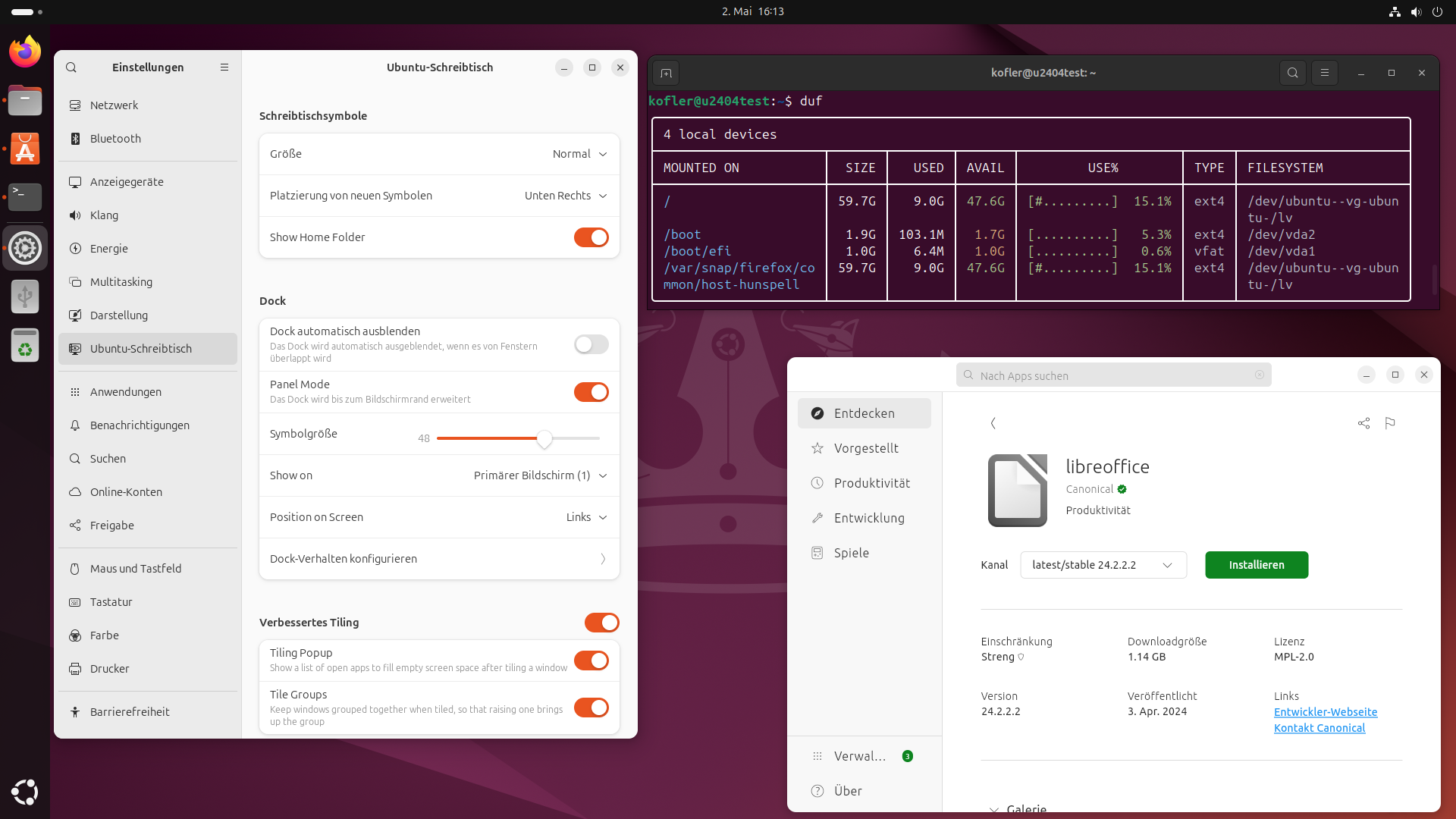
Ubuntu 24.04 alias Noble Numbat alias Snubuntu ist fertig. Im Vergleich zur letzten LTS-Version gibt es einen neuen Installer, der nach einigen Kinderkrankheiten (Version 23.04) inzwischen gut funktioniert. Ansonsten kombiniert Ubuntu ein Kernsystem aus Debian-Paketen mit Anwendungsprogramme in Form von Snap-Paketen. Für die einfache Anwendung bezahlen Sie mit vergeudeten Ressourcen (Disk Space + RAM).
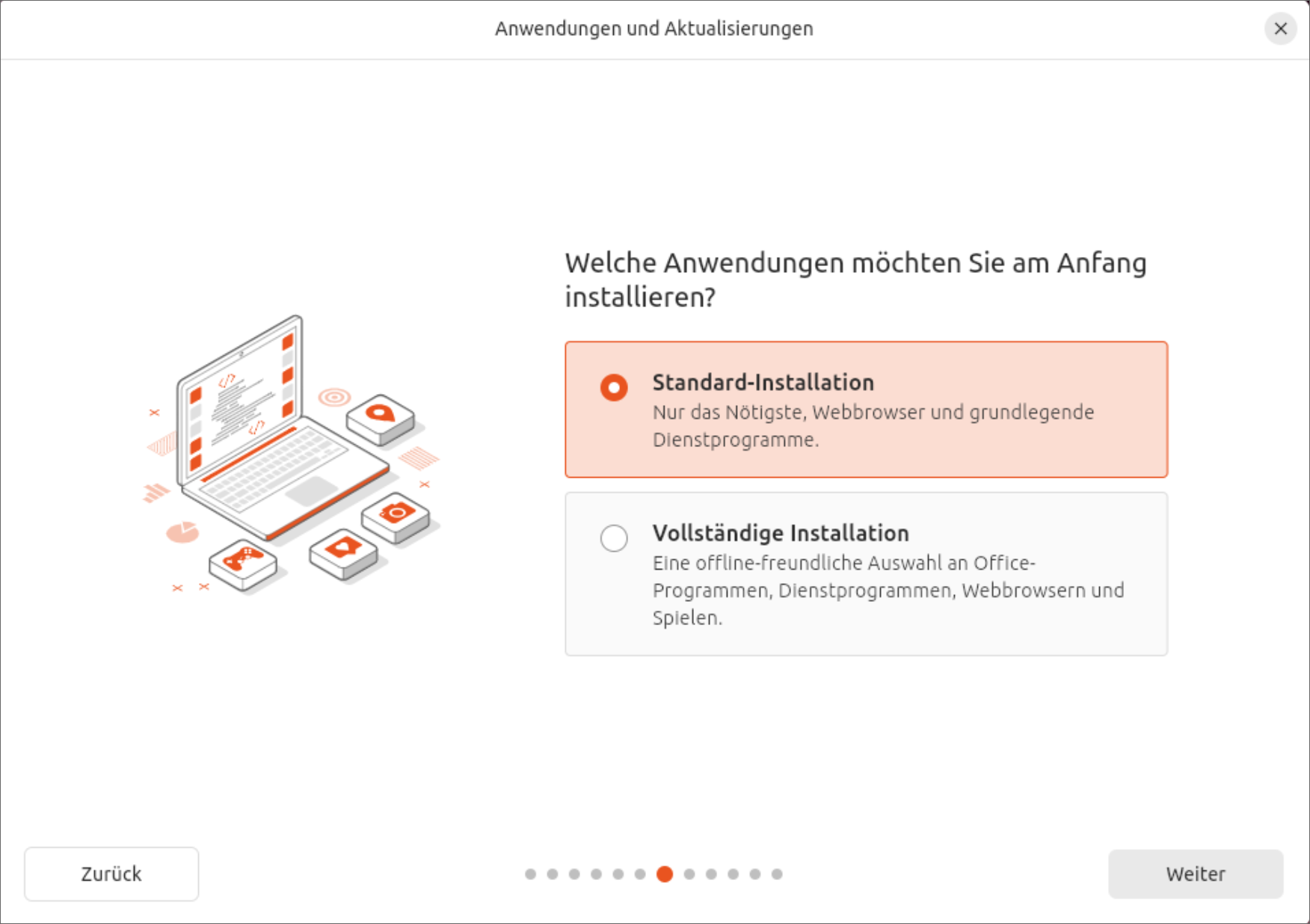
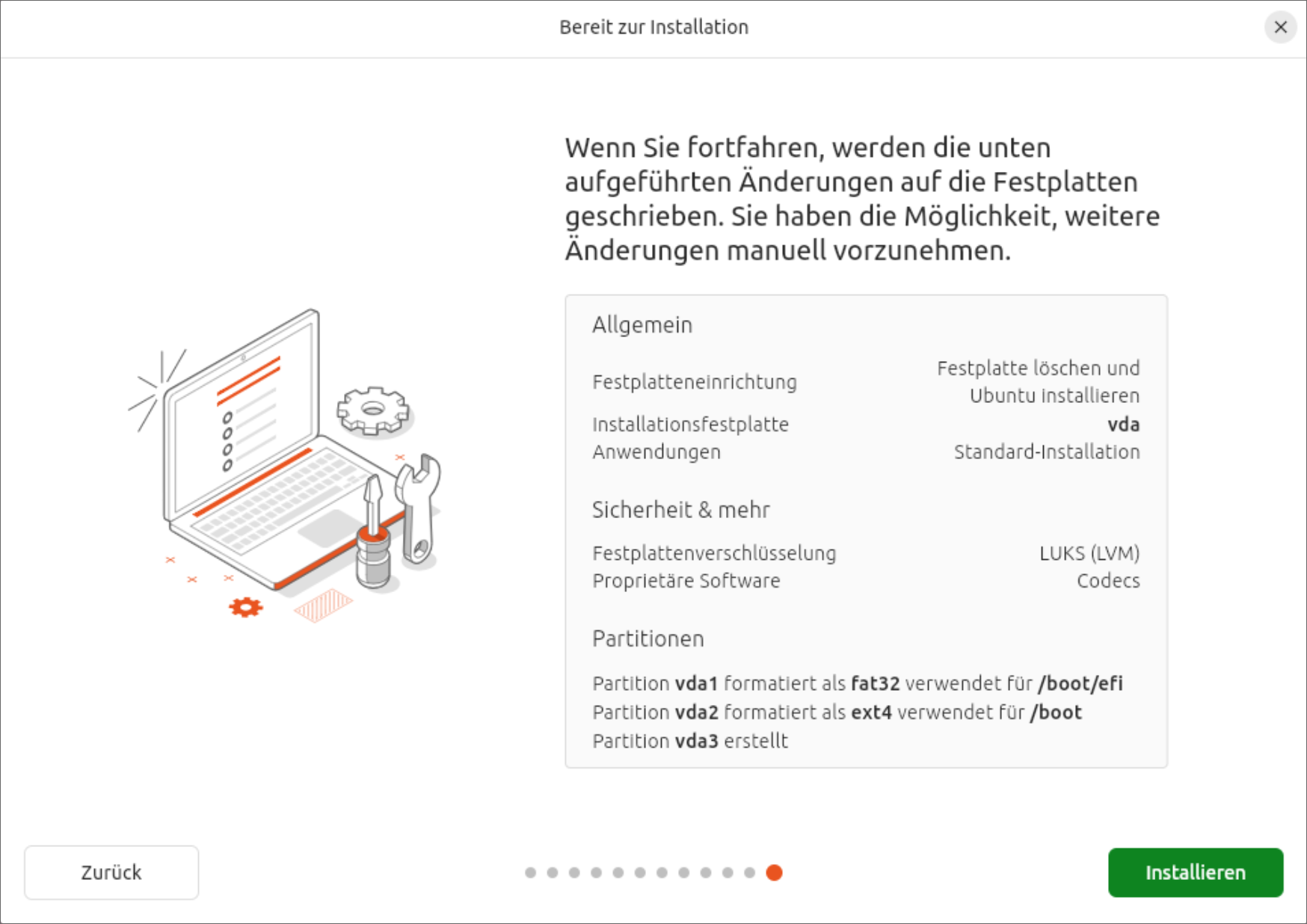
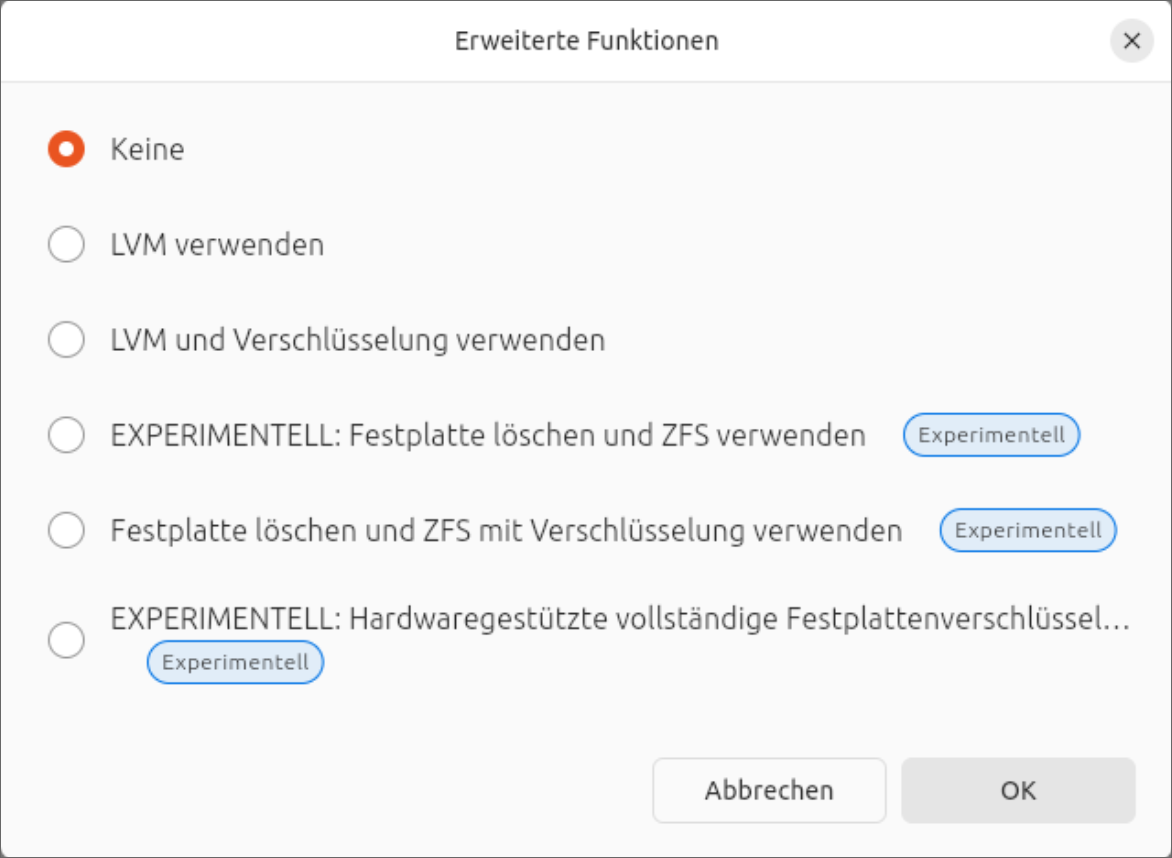
Das neue Installationsprogramm hat bei meinen Tests gut funktioniert, inklusive LVM + Verschlüsselung. Einfluss auf die Partitionierung können Sie dabei allerdings nicht nehmen. (Das Installationsprogramm erzeugt eine EFI-, eine Boot- und eine LVM-Partition, darin ein großes Logical Volume.) Zusammen mit der Installation erledigt der Installaer gleich ein komplettes Update, was ein wenig Geduld erfordert.
Standardmäßig führt das Programm eine Minimalinstallation durch — ohne Gimp, Thunderbird, Audio-Player usw. Mit der Option Vollständige Option verhält sich der Installer ähnlich wie in der Vergangenheit. Ein wenig absurd ist, dass dann einige Programme als Debian-Pakete installiert werden, während Ubuntu sonst ja bei Anwendungsprogrammen voll auf das eigene Snap-Format setzt. Wenn Sie Ubuntu installieren, entscheiden Sie sich auch für Snap. Insofern ist es konsequenter, eine Minimalinstallation durchzuführen und später die entsprechenden Snaps im App Center selbst zu installieren.
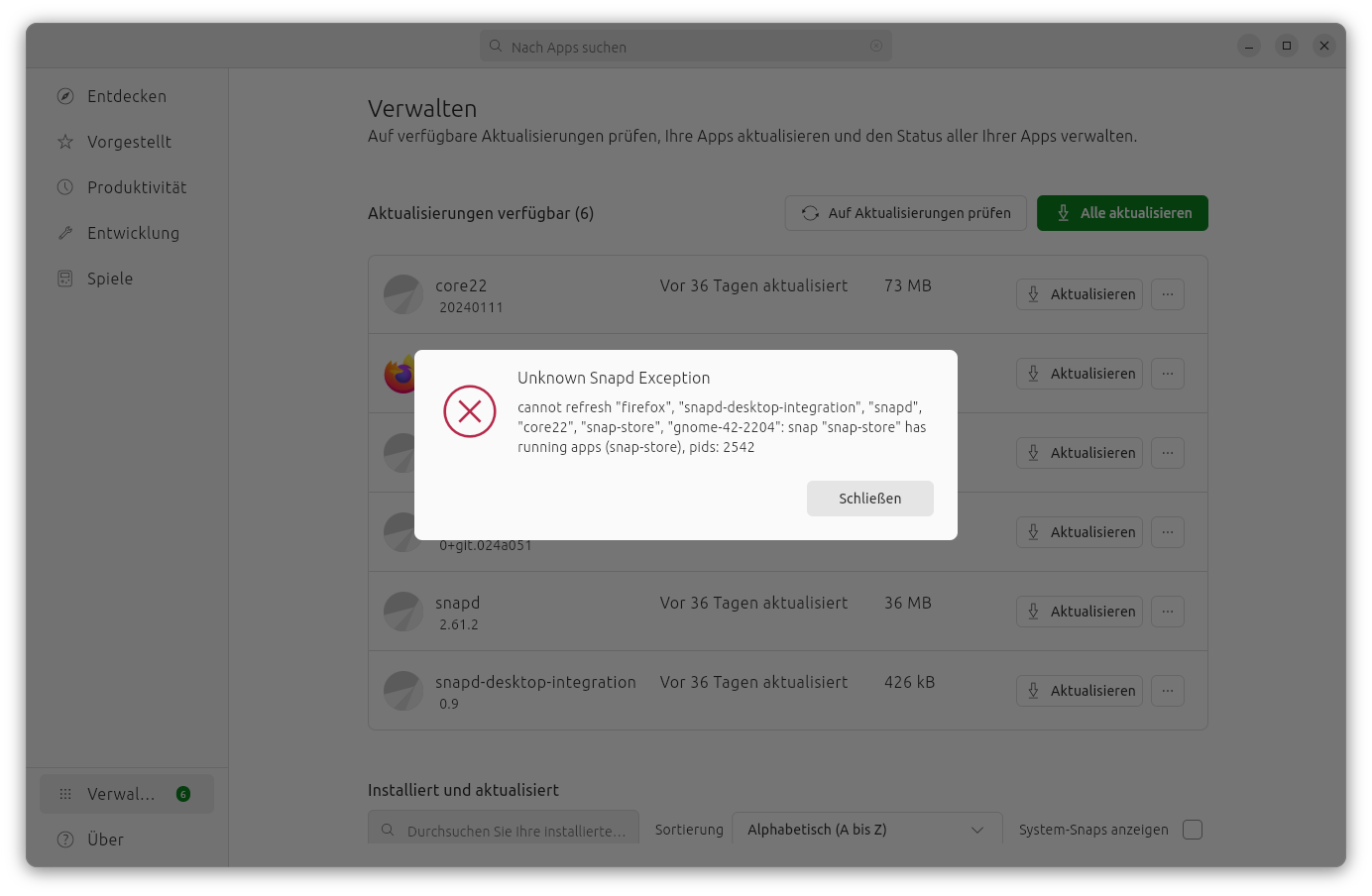
Auf das Lamentieren über Snaps verzichte ich dieses Mal. Wer will, kann diesbezüglich meine älteren Ubuntu-Tests nachlesen. Für Version 24.04 hat Andreas Proschofsky in derstandard.at alles gesagt, was dazu zu sagen ist. Der größte Vorteil von Snaps für Canonical besteht darin, dass sich der Wartungsaufwand für Desktop-Programme massiv verringert: Die gleichen Snap-Pakete kommen in diversen Ubuntu-Versionen zum Einsatz.
Mit Ubuntu 24.04 hat Netplan den Sprung zu Version 1.0 gemacht. Größere Änderungen gab es keine mehr, die Versionsnummer ist eher ein Ausdruck dafür, dass Canonical die Software nun als stabil betrachtet. Wie bereits seit Ubuntu 23.10 ist Netplan das Backend zum NetworkManager. Netzwerkverbindungen werden nicht in /etc/NetworkManager/system-connections/ gespeichert wie auf den meisten anderen Distributionen, sondern als /etc/netplan/90-NM-*.yaml-Dateien (siehe auch meinen Bericht zu Ubuntu 23.10).
Ubuntu 24.04 kommt out-of-the-box mit HEIC/HEIF-Dateien zurecht, also mit am iPhone aufgenommenen Fotos. Vor einem dreiviertel Jahr hatte ich noch über entsprechende Probleme berichtet. Im Forum wurde damals kritisiert, dass meine Erwartungshaltung zu hoch sei. Aber, siehe da: Es geht!
Basis              Programmierung    Server
---------------    ---------------   --------------
Kernel      6.8    bash        5.2   Apache     2.4
glibc      2.39    docker.io  24.0   CUPS       2.4
Gnome        46    gcc        13.2   MariaDB  10.11
X-Server   21.1    git        2.43   MySQL      8.0
Wayland    1.34    Java         21   OpenSSH    9.6
Mesa       24.0    PHP         8.3   qemu/KVM   8.2
Systemd     255    Python     3.12   Postfix    3.8
NetworkMan 1.46                      Samba     4.19
GRUB       2.12
Seit ich Ubuntu auf dem Desktop kaum mehr nutze, habe ich mehr Distanz gewonnen. So fällt mein Urteil etwas milder aus ;-)
Für Einsteiger ist Ubuntu eine feine Sache: In den meisten Fällen funktioniert Ubuntu ganz einfach. Das gilt sowohl für die Unterstützung der meisten Hardware (auch relativ moderne Geräte) als auch für die Installation von Programmen, die außerhalb der Linux-Welt entwickelt werden (VSCode, Android Studio, Spotify etc.). Was will man mehr? Ubuntu sieht zudem in der Default-Konfiguration optisch sehr ansprechend aus, aus meiner persönlichen Perspektive deutlich besser als die meisten anderen Distributionen. Ich bin auch ein Fan der ständig sichtbaren seitlichen Task-Leiste. Schließlich zählt Canonical zu den wenigen Firmen, die noch Geld in die Linux-Desktop-Weiterentwicklung investieren; dafür muss man dankbar sein.
Alle, die einen Widerwillen gegenüber Snap verspüren, sollten nicht über Ubuntu/Canonical schimpfen, sondern sich für eine der vielen Alternativen entscheiden: Arch Linux, Debian, Fedora oder Linux Mint. Wer nicht immer die neueste Version braucht und sich primär Langzeit-Support wünscht, kann auch AlmaLinux oder Rocky Linux in Erwägung ziehen.
Tests

Der Multiplayer-Online-Hit League of Legends hat zum Start in den Mai ein Update auf Version 14.9 erhalten. Damit halten die Anti-Cheat-Software Vanguard und TPM-2.0-Pflicht Einzug. Spieler, die den für Windows veröffentlichten Titel zuletzt unter Linux gespielt haben, sind damit raus. Doch Riot Games sah keinen anderen Weg.

 ARD und ZDF wollen gemeinsam ein Betriebssystem speziell für Mediatheken entwickeln. Die Ergebnisse sollen als Open Source erscheinen. (
 Jede Mastodon-Instanz ruft die für die Link-Vorschau nötigen Daten selbst vom zugehörigen Webserver ab. Dadurch entsteht nicht selten eine Anfragenflut mit DDoS-Charakter. (
 Eine Softwareingenieurin, die nur als Hazel bekannt ist, hat seit mehr als zwei Jahren fast 7.500 Firefox-Tabs auf ihrem Mac offen gehalten. (