 Anmelden
BSI: AI enables "unprecedented quality" for phishing attacks

The German Federal Office for Information Security warns of security threats from artificial intelligence. However, much is still up in the air.

The German Federal Office for Information Security warns of security threats from artificial intelligence. However, much is still up in the air.

The "MuseBook" and the Banana Pi BPI-F3 are equipped with the SpacemiT Keystone K1, whose RISC-V cores are designed to outperform the ARM Cortex-A55.
 Freunde des grünen Chamäleons aufgepasst! Die RC Testversion von openSUSE Leap 15.6 ist reibungslos von der Beta-Phase zum Release-Kandidaten übergegangen. Der RC von openSUSE Leap 15.6 kann ab sofort frei heruntergeladen und ausprobiert werden. Eine der am meisten erwarteten Funktionen in diesem Release ist die Integration von Cockpit, einer schlanken webbasierten Administrationsoberfläche, die eine intuitivere...
Der Beitrag openSUSE Leap 15.6 RC jetzt verfügbar erschien zuerst auf MichlFranken.

Das "KI-Update" liefert werktäglich eine Zusammenfassung der wichtigsten KI-Entwicklungen.

Das "MuseBook" sowie der Banana Pi BPI-F3 sind mit dem SpacemiT Keystone K1 bestückt, dessen RISC-V-Kerne den ARM Cortex-A55 übertreffen sollen.
Am 14. Mai in Berlin: Erleben Sie den SCS Summit! Feiern Sie den dritten Geburtstag des Sovereign Cloud Stack und entdecken Sie, wie offene Standards die digitale Zukunft Deutschlands gestalten. Jetzt anmelden!
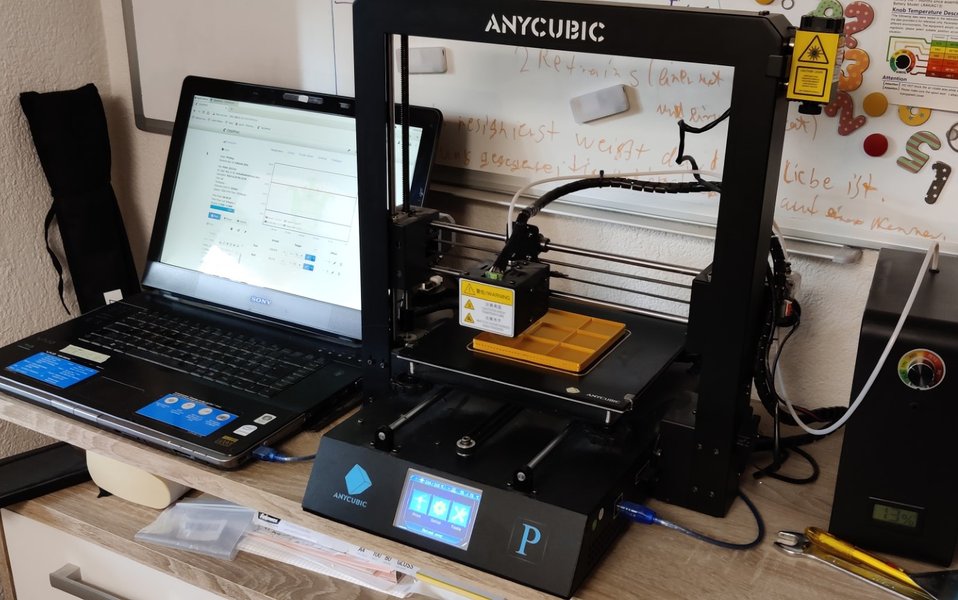
Ich steuere meinen 3D-Drucker mithilfe von OctoPrint, welches als LXC auf Proxmox läuft. Proxmox hat dabei seinen eigenen Desktop, mit dem man auf den Webhost von OctoPrint zugreifen kann.

Find out more about the Youth Hacking 4 Freedom participants of the 2023 edition. We are continuing this series talking with Antoni and Tobias: Antoni developed a dictionary to preserve endangered languages, and Tobias conceived a rich featured calendar.

Antoni and Tobias participated in YH4F in 2023, being both currently in their last year of high school. Antoni is Polish and he developed the Endangered Languages Dictionary, software with the purpose of keeping languages at risk of extinction alive, valuing the contribution of native language speakers. Tobias comes from the Netherlands, and he developed Plan2Go, a calendar webapp he got the idea for while talking with his friends.
Read along to learn more about these projects and their developers!
FSFE: Hi Tobias and Antoni! Can you introduce yourselves before explaining your projects?
Tobias: I’m Tobias from the Netherlands and I’m 17 years old. I love programming and helping others by making software. Sometimes I play video games or make stuff for video games.
Antoni: My name is Antoni, I am a high school student from Poland. I’m mainly a linguistics and computer science nerd, but am also interested in sociology, psychology, cultural studies, literature, and philosophy. I would like to study computer science and classics.
FSFE: What is the project you developed for YH4F 2023? How does it work?
Antoni: The Endangered Languages Dictionary (ELD) project aims to be a dictionary for the world’s languages that are at risk of extinction. The project home page–still in construction–intends to only have a title in Esperanto and a bar redirecting to the selected language main page. There one can search for a phrase. The browser calculates Levenshtein’s distance between the phrase being searched and all the phrases in the given sub-dictionary (the upper limit of the search is the number to the left of the search bar that one can specify, the default is 2). All phrases meeting the specified criteria are displayed on the page as hyperlinks to their specific pages.
 The landing page of the Endangered Languages Dictionary
Tobias: I developed Plan2Go with the idea to make a planning app that is fully customisable and with many features. The front end has been coded with HTML and CSS, and the calendar and customisations are made using JavaScript. You can get access to the calendar by using the website hosted on GitLab Pages, by cloning the code and building the source, or by using the desktop app.
 The main page of Plan2Go with example events
Tobias: Once you are in, you see an overview of the current month and you can click to add new events. If you click on an existing event, you can view more details about it and you can delete it. If you click above an event, you can add another event. Using the “Back” and “Next” buttons you can go back and forward in months. When an event starts, you could get a notification [not fully working, see below in the interview]. Overall, its key features are: multiple events per day, theme switcher, exporting and importing iCals, secret Easter Eggs, PWA installable and a desktop app version available.
 Plan2Go example event details window
FSFE: What motivated you to create this software?
Antoni: I wanted to provide an online presence of the endangered languages to prevent their native speakers, especially the young ones, from abandoning their tongues. I believe “if you aren’t online, you don’t exist” to be an unjust rule. This dictionary was going to be the first step in achieving this.
Tobias: Mostly, the idea came while talking with my friends, who just started programming. We made a whole list of stuff that we could make, and we shared this list publicly. Eventually, I just let my friends choose what to do. They chose to go with a planner, and we made that.
FSFE: Your projects are Free Software! When and how did you get in touch with the movement?
Antoni: One day, at school, I was chatting with a classmate and introduced Windows Subsystem for Linux (WSL) to him. He replied he preferred VirtualBox, as “it is open source” After I explained to him that he was wrong [VirtualBox is licensed under GPL, but the extensions are proprietary], and the openness of the source code of WSL, he asked for evidence, and he got it. After examining the codebase, he wrote me: “It is quite similar to the situation when you would paint a beautiful white shirt in brown just to wallow it in the mud. (of course the shirt is Linux)”. This has influenced me to the degree that I got pushed even further in that direction than my classmate.
Tobias: I always only made software for myself, I began to do it more seriously when I found out that other people might also want my software. So I published it online, without any license.
FSFE: So it seems that at the time you did not know that by default, if you do not specify a license, it is copyrighted.
Tobias: Yes, I discovered Free Software licenses thanks to YH4F!
FSFE: Both projects are very interesting and ambitious. Why did you decide to code them from scratch, rather than to contribute existing projects?
Tobias: It’s always nice to have one [project] that you can completely modify the way you want. If you are going to contribute to other projects that are already kind of finished, there is only a little bit of stuff that you might be able to add. We had about six months, and I did not really think I could just spend all of it contributing to just an existing project. Most probably, I would have been done before the end of the coding period. Above all, it is very helpful to know what’s behind a project you build from scratch by your own.
Antoni: I didn’t find any Free Software similar to mine, though I didn’t actively do any in-depth research. If it comes to the value of ELD, it is low-bandwith friendly as it doesn’t depend heavily on stylesheets. Additionally, this also implies a decrease of resources. needed only to render a webpage!
FSFE: How was the experience of developing your software during YH4F 2023?
Antoni: What I enjoyed the most was the fact that this is not only a competition, but also an opportunity to learn something, just by participating! I think that is mainly because of the long timespan given and the short list of requirements.
Tobias: I liked the whole thing! You can program stuff, you can join meetings with other participants and have a discussion. For example, you can explain your project and then get some feedback. That’s the deal: making software and getting feedback from others. And just having fun.
FSFE: What are the future plans for your project?
Antoni: I would like to share the message to conserve endangered languages because it is quite sad that we are losing linguistic diversity. The world would be less interesting and less rich. About extending the project, I am going to pause its development, and get back to it once I have resources, such as time and money.
Tobias: If I find the time and I get an idea to add something to the software or just fix a feature that does not work right now (like the time notifications) then I will work on it. Otherwise, I will just leave it as it is right now.
FSFE: Thank you Antoni and Tobias. We wish you a bright future and a lot of success with your plans!
The 2024 edition of Youth Hacking 4 Freedom is still going on now! The coding period ends on 30 June and you can still take part in the 2024 edition via last minute registration. Check out the YH4F website to find out all the details of this competition or feel free to reach out to the organisers via mail!
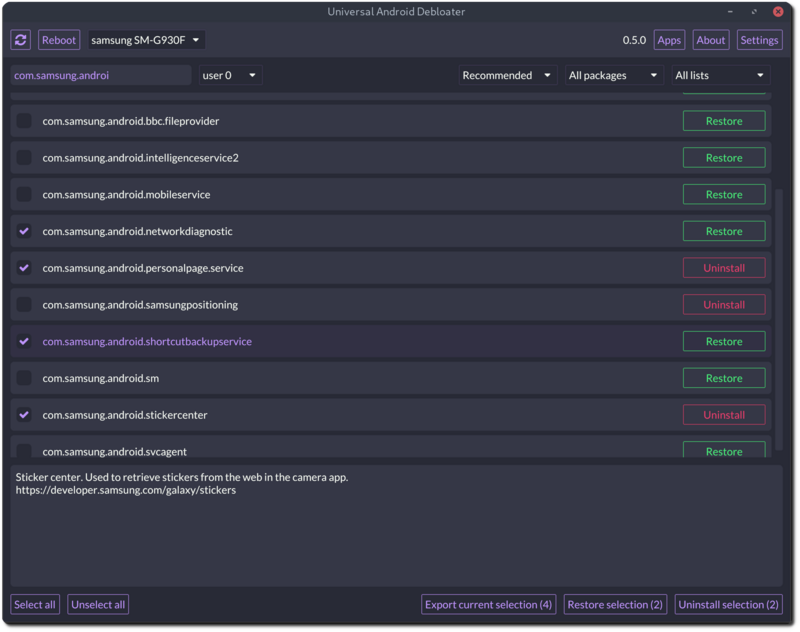
Android-Geräte enthalten oft sehr viele Apps, die sich weder deinstallieren noch deaktivieren lassen. Debloater-Software kann den Weg aus der "Bloatware-Hölle" erleichtern.


Der Open-Source-Videoeditor Shotcut, plattformübergreifende Videoschnittsoftware, die zahlreiche Audio- und Videoformate unterstützt, ist in der neuesten Version 24.04.28 für Windows, macOS und Linux erschienen. Neu ist unter anderem die Aktualisierung auf das Media Lovin' Toolkit („MLT“) 7.24.0.

Genehmigung für Teslas FSD + Razer zur Kasse gebeten + China zeigt humanoiden Roboter + Microsoft nimmt Sicherheit ernst + Digitaler Euro mit Fürsprecher

With Tiangong, the Chinese government has made a platform for humanoid robots largely available as open source.

Der chinesische Staat hat mit Tiangong eine Plattform für humanoide Roboter weitgehend als Open Source zur Verfügung gestellt.

Das Bundesamt für Sicherheit in der Informationstechnik warnt vor Sicherheits-Bedrohungen durch Künstliche Intelligenz. Noch aber sei vieles Zukunftsmusik.

Die Open-Source-Sammlung MKVToolnix mit Werkzeugen rund um den MKV-Container ist in Version 84.0 unter dem Codenamen „Sleeper“ mit einigen Änderungen und Verbesserungen erschienen. Hinzugefügt wurde beim MP4-Reader von „mkvmerge“ unter anderem eine Unterstützung für FLAC in MP4.
Ein subjektives Review des Steam Decks.


 Das Finanzamt hat dem Open-Source-Netzwerk seinen Status aberkannt. Mastodon gründet jetzt ein neues Non Profit - in den USA. (Mastodon, Open Source)
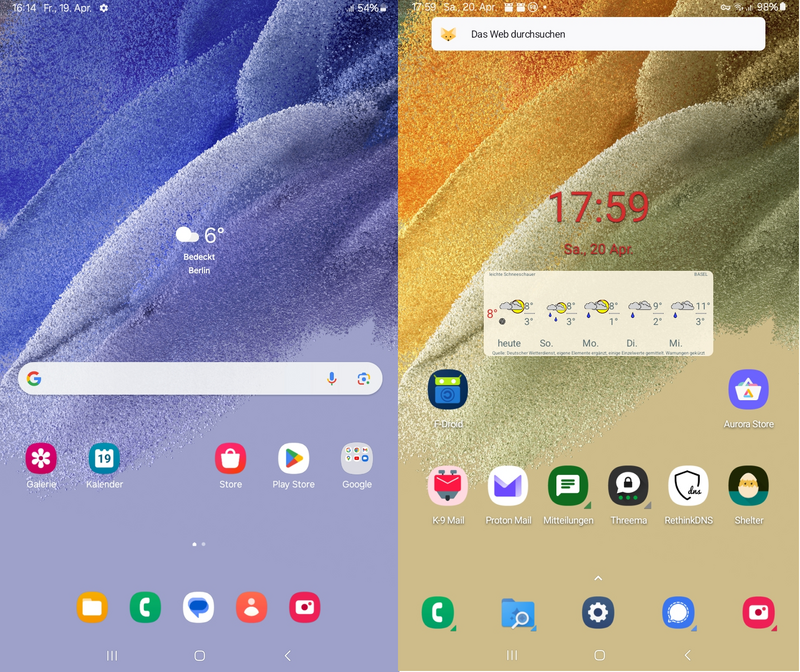
Teil 1: Samsung Phablet

Da ich einiges an Zeit in meine auf dem Raspberry Pi 4 laufende Nextcloud investiert habe, wäre es schade, für das aktuelle Raspberry Pi OS 12, alles noch einmal aufsetzen und konfigurieren zu müssen. Obwohl die Entwickler des Betriebssystems von einem Upgrade generell abraten, habe ich mich auf die Suche nach einer guten und funktionierenden Anleitung gemacht und bin auf den vielversprechenden Artikel „Raspberry Pi OS – Update von Bullseye (11) auf Bookworm (12)“ von Sascha Syring gestoßen.
Um das Ganze ausgiebig zu testen, habe ich das Upgrade zuerst auf einem Raspberry Pi 4 durchgeführt, auf dem ein Mumble-Server läuft, den unsere Community produktiv zum Erfahrungsaustausch nutzt. Nachdem dies alles problemlos funktioniert hat, habe ich mich an meinen Nextcloud-RasPi gewagt. Was es weiter zu beachten gab, darauf gehe ich am Ende des Artikels noch ein.
Bevor es los geht muss das System auf den aktuellsten Stand unter Raspberry Pi OS 11 Bullseye gebracht werden. Hierzu führt man Folgendes aus:
sudo apt update && sudo apt upgrade && sudo apt dist-upgrade
Danach werden die Paketquellen auf das neue System Bookworm angepasst. Hierzu öffnet man die /etc/apt/sources.list
sudo nano /etc/apt/sources.list
und kommentiert alle aktiven Quellen, indem man vor jede aktive Zeile eine Raute „#“ setzt. Danach fügt man die drei Zeilen
deb http://deb.debian.org/debian bookworm main contrib non-free non-free-firmware
deb http://security.debian.org/debian-security bookworm-security main contrib non-free non-free-firmware
deb http://deb.debian.org/debian bookworm-updates main contrib non-free non-free-firmware
am Anfang ein und speichert die Datei mit Ctr + o ab und verlässt dann den Editor mit Ctr + x.

Das Gleiche Spiel wiederholt man mit den zusätzlichen Paketquellen.
sudo nano /etc/apt/sources.list.d/raspi.list
Hier wird nun folgende Zeile an den Anfang gesetzt:
deb http://archive.raspberrypi.org/debian/ bookworm main
Die Datei wird mit Ctr + o gespeichert und der Editor mit Ctr + x verlassen. Ist dies geschehen, können die Paketquellen neu eingelesen werden.

sudo apt update
Nun kommt der kniffligste Teil. Die Bootpartition muss an die neuen Gegebenheiten angepasst werden. Dazu wird die alte Boot-Partition ausgehängt.
sudo umount /boot
Dann wird das neue Verzeichnis /boot/firmware erstellt.
sudo mkdir /boot/firmware
Jetzt bearbeitet man die Partitionstabelle:
sudo nano /etc/fstab
Hier wird der Eintrag der Bootpartition entsprechend eingetragen. Bei mir sieht das so aus:

Die Datei wird wieder mit Ctr + o gespeichert und der Editor mit Ctr + x verlassen. Damit die Änderungen wirksam werden, wird systemd neu geladen
sudo systemctl daemon-reload
und die neue Boot-Partition gemountet.
sudo mount /boot/firmware
Im Nachgang werden die aktuelle Firmware und der aktuelle Kernel für das Raspberry Pi OS 12 (Bookworm) installiert
sudo apt install raspi-firmware linux-image-rpi-v8
und der alte Bootloader und Linux-Kernel entfernt.
sudo apt remove raspberrypi-kernel raspberrypi-bootloader
Ist dies geschehen, müssen die Paketquellen nochmalig mit
sudo apt update
eingelesen werden.
Nun kann das eigentlich Upgrade durchgeführt werden. Hierbei stoppt der Vorgang bei den wichtigsten Konfigurationsdateien. Diese werden in der Regel alle beibehalten.
sudo apt full-upgrade
Nun wird das System noch aufgeräumt.
sudo apt autoremove
sudo apt clean
Nach dem Neustart
sudo reboot now
sollte nun das aktuelle Raspberry Pi OS 12 laufen. Das installierte Betriebssystem lässt man sich mit
cat /etc/os-release
anzeigen.
PRETTY_NAME="Debian GNU/Linux 12 (bookworm)"
NAME="Debian GNU/Linux"
VERSION_ID="12"
VERSION="12 (bookworm)"
VERSION_CODENAME=bookworm
ID=debian
HOME_URL="https://www.debian.org/"
SUPPORT_URL="https://www.debian.org/support"
BUG_REPORT_URL="https://bugs.debian.org/"
Mit
uname -a
kann man nun den aktuellen Kernel checken. Meine Ausgabe sieht wie folgt aus:
Linux nextcloud 6.6.20+rpt-rpi-v8 #1 SMP PREEMPT Debian 1:6.6.20-1+rpt1 (2024-03-07) aarch64 GNU/Linux
(„nextcloud“ in dieser Zeile ist der Hostname)
Abschließend sei darauf hingewiesen, dass das Upgrade einige Gefahren in sich birgt. Bitte vorher unbedingt an ein Backup denken, was im Bedarfsfall wieder eingespielt werden kann!
Eingangs des Artikels hatte ich erwähnt, dass es Weiteres zu beachten gibt. Durch das Upgrade wurden die Einstellungen des Dienstes zu meinem Turn-Server zurück gesetzt. Ein funktionierender Turn-Server ist wichtig, um reibungslosen Verlauf in Videokonferenzen zu ermöglichen.
Wer also wie ich eine Nextcloud auf dem Raspberry Pi installiert hat und bisher meinen Anleitungen gefolgt ist, muss den zeitverzögerten Start des Turnservers, wie im Artikel „coTurn zeitverzögert auf Raspberry Pi starten“ beschrieben, wieder neu konfigurieren. Dazu editiert man die Datei /lib/systemd/system/coturn.service:
sudo nano /lib/systemd/system/coturn.service
Nun fügt man den folgenden Eintrag unter [Service] ein und speichert die Änderung mit Ctlr + o.
ExecStartPre=/bin/sleep 30
Den Editor verlässt man dann wieder mit Ctrl + x. Durch den Eintrag wird nun eine Verzögerung von 30 Sekunden erzwungen. Mit
sudo service coturn restart
wird der Turnserver zeitverzögert neu gestartet. jetzt arbeitet coTURN nach dem nächsten Reboot des Raspberry Pi wie gewünscht.
Viel Erfolg!

Nicht immer lässt sich zeitnah über jede Neuigkeit berichten, manche Ereignisse sind es aber dennoch Wert, Erwähnung zu finden. In dieser Zusammenfassung überblickt die Redaktion alle wichtigen Meldungen aus der Linux-Welt der vorangegangen Woche.
In KW 17 ist in der FOSS Welt einiges passiert! Von Flathub bis Ubuntu.



 Die Teams für Python und Flutter verlieren Mitarbeiter. Deren Aufgaben sollen Berichten zufolge Google-Abteilungen in Deutschland übernehmen. (
 Neue Versionen der Unreal-Engine, von FFmpeg, Ubuntu, OpenBSD und NetBSD sind da - und auch ein Linux für Autos. Zudem ist eine CRA-Zusammenarbeit geplant. (
 Das Open-Source-Storage-Projekt hat auch den Termin des Cephalocon 2024 und drei Diamond-Mitgliedschaften bekanntgegeben. (