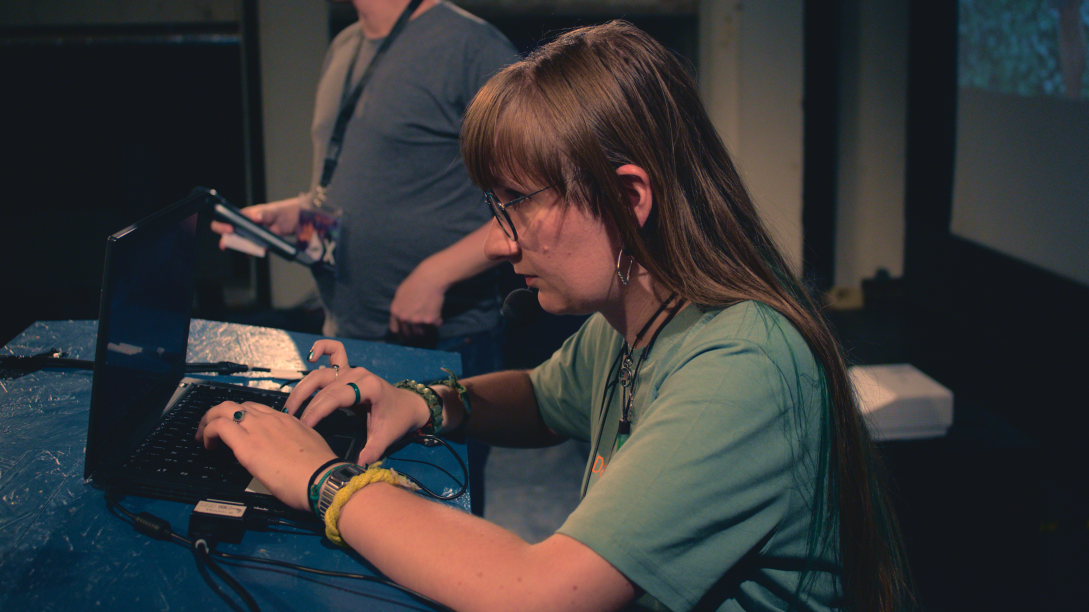
LLW 2024: A forum for difficult legal topics of Free Software in Gothenburg
For the second year in a row, the Swedish city of Gothenburg hosted an
edition of the Free Software Legal & Licensing Workshop (LLW), the
annual conference for Legal Network members. The 2024 edition brought
new faces and great discussions and presentations on current legal and
licensing issues related to technological developments such as AI.

Under a sunny and blue sky, the beautiful Swedish city of Gothenburg
once again hosted FSFE’s Free Software
Legal & Licensing Workshop (LLW), a two and a half day
conference for members of the Legal Network community to meet
face-to-face and share legal expertise in a safe space. It was great to
have attendees engaging with the speakers in interesting legal
discussions, as well as to see them use the venue to engage in impromptu
discussions on legal theory, policy, and case law related to Free
Software topics. This shows how valuable this conference has become for
Free Software legal professionals, who arrived from Europe, the
Americas, and Asia, and the importance of a healthy community to
encourage discussion of the most current Free Software legal topics and
to network in order to build a culture of knowledge exchange in the
legal sector.
Discussion, even controversial, can help legal experts to make better
decisions while accomplishing the mission of empowering users to
control technology. Good examples are Artificial Intelligence and
Machine Learning, that continued to be hot topics during this year’s
edition, with a number of discussions on the conference agenda touching
on the legal ramifications of AI developments on software and licensing.
Nevertheless, there were many other developments from the past year for
attendees to discuss as well, from new legislative initiatives and case
law in various jurisdictions within and outside the European Union, to
presentations to introduce various community-initiated compliance tools,
to conversations about more philosophical ideas regarding Free Software
and community.
"I have been working for 2 years in this field now. In the past 2 days I
learnt more on those topics than in the 2 years before", said one
participant in LLW 2024
This conference also gives newcomers who may be a little shy about
participating in discussions on the mailing list a chance to introduce
themselves and meet various more established members of the community in
person. The FSFE believes in the importance of supporting young
professionals, which is why this conference also offers a mentoring
programme, so that experienced members can help integrate newcomers into
the Free Software legal community, as well as to help them build
professional connections and expertise.
We appreciate all Legal Network members who took the time to participate
in person and hope to see them again next year. It is extremely
heartening for us to see the Free Software legal community grow in
strength and knowledge with regular meetings like the LLW.
We want to thank our sponsors: Intel, Red Hat, Microsoft, Amazon, Bosch,
Ericsson, Siemens, Volvo, Bird & Bird, Google, the law firm Heuking,
and the Open Invention Network.
The Legal Network
The Legal Network is a neutral,
non-partisan group of experts in different fields involved in Free
Software legal issues. Currently the Legal Network has over 400
participants from different legal systems, academic backgrounds and
affiliations.
The aim of the Legal Network is to promote discussion and foster better
knowledge of the legal constructs that back Free Software. The
conversations on the Legal Network are intended to be dynamic,
thought-provoking, and up to speed with the most recent developments.
The Legal Network is a safe space to promote legal knowledge about Free
Software so that companies can make strategic decisions about Free
Software development based on an understanding of how Free Software
licensing and other related legal issues work. This allows Free Software
developers and legal professionals who work within larger companies to
continue to contribute to software freedom.
Admission to the Legal
Network is restricted, and the discussions held there are
confidential. Nevertheless, this does not mean that the content of the
mailing list is contained away from the larger Free Software community.
The Chatham
House Rule applies to all discussions on the Legal Network mailing
list and at Legal Network events, which enables members to use the
information received, but not to reveal the identity nor the affiliation
of the speaker or any of the participants involved in the discussion.
Support FSFE
 Anmelden


 ARD und ZDF wollen gemeinsam ein Betriebssystem speziell für Mediatheken entwickeln. Die Ergebnisse sollen als Open Source erscheinen. (



 Jede Mastodon-Instanz ruft die für die Link-Vorschau nötigen Daten selbst vom zugehörigen Webserver ab. Dadurch entsteht nicht selten eine Anfragenflut mit DDoS-Charakter. (





 Eine Softwareingenieurin, die nur als Hazel bekannt ist, hat seit mehr als zwei Jahren fast 7.500 Firefox-Tabs auf ihrem Mac offen gehalten. (
 Bei Pokémon Go ist seit dem 22. April das Wurm-Pokémon Schligda erhältlich. Einige Spieler greifen zu fragwürdigen Mitteln, um es zu fangen. (

 Keycloak als Spitzenreiter unter den Open-Source-Tools für Identity und Access Management (IAM) gewährleistet eine effiziente Authentifizierung und Autorisierung. Dieser dreitägige Workshop bietet einen fundierten Einstieg. (
 An Arch Linux streiten sich die Geister. Die einen finden es zu umständlich. Die anderen perfekt, weil es wie ein maßgeschneidertes System ist. Mein letzter Test von puren Arch Linux ist schon knapp 4 Jahre her. Höchste Zeit im Jahr 2024 mal wieder das originale Arch Linux unter die Lupe zu nehmen. Ich wünsche Euch...